
more generous area for the cursor to split viewport (modal key?)
I love the concept of blender's UI so much.
No overlapping - split viewport, define content.
Spltting VPs has become even more difficult in 2.8 now that there is no longer a visual cue, especially when using a tablet
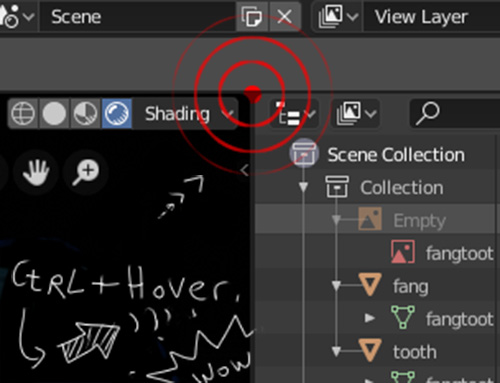
my proposal would be: holding control while hovering the cursor near a corner would result in a larger active area with some visual response
5 Comments
Good suggestion. I have wasted far too much time attempting to close view-ports that I accidentally created while attempting to close view-ports.
I don't think hiding this functionality behind the control key is a good thing. The thing could just pop as you hover your mouse over that location on screen. Or when you hover your mouse cursor over the viewport edge anywhere.
I'd also love if the margin for the mouse cursor to click and drag the edge of a viewport was also bigger. Now it is maybe couple of pixels wide and it wouldn't hurt if it was couple of pixels wider. Also those + icons for the n and t panels could use the n and t keys instead of the +.
@o7216059: I agree that it is not necessary to request the use of the Ctrl key for that purpose. Just a small delay of nearly 300 to 500ms before widening the separator would be good. And why not having this delay as an option in the user preferences ?
I would actually love to just see a hotkey implementation like some Linux distros have, where if you hold something like "Ctrl + Alt + RMB drag in a direction," it will merge / split the window in that direction
Yes!! I would love to have a way to make moving windows around easier!!
I kind of agree with the workspaces thing, but I end up always making windows when I want to do different stuff instead of going to workspaces, and sometimes it is a pain to do that because of the missclicks!
the control thing sounds like a good idea! it would increase the area you can click, and maybe even with some visual aids. even if this conflicts with other shortcuts, that it will for sure! since it is just on the corners, it might not even be an issue.
I would even say I would prefer an actual edit windows mode, where you click a button or shortcut to enter and edit windows mode that disables everything else and just allowes you to move windows around with some cool widgets! but that might sounds crazy to some more hardcore people ;)