
Shortcut for Move/Rotate/Scale Gizmo
I really miss a shortcut to activate the transform gizmos (move/rotate/scale). I know, there is the shortcut shift-spacebar where you can choose between the gizmos. But it's still a bit unhandy compared to a "real shortcut" for every type of transformation gizmo as you often have to switch between move/scale/rotate quickly...
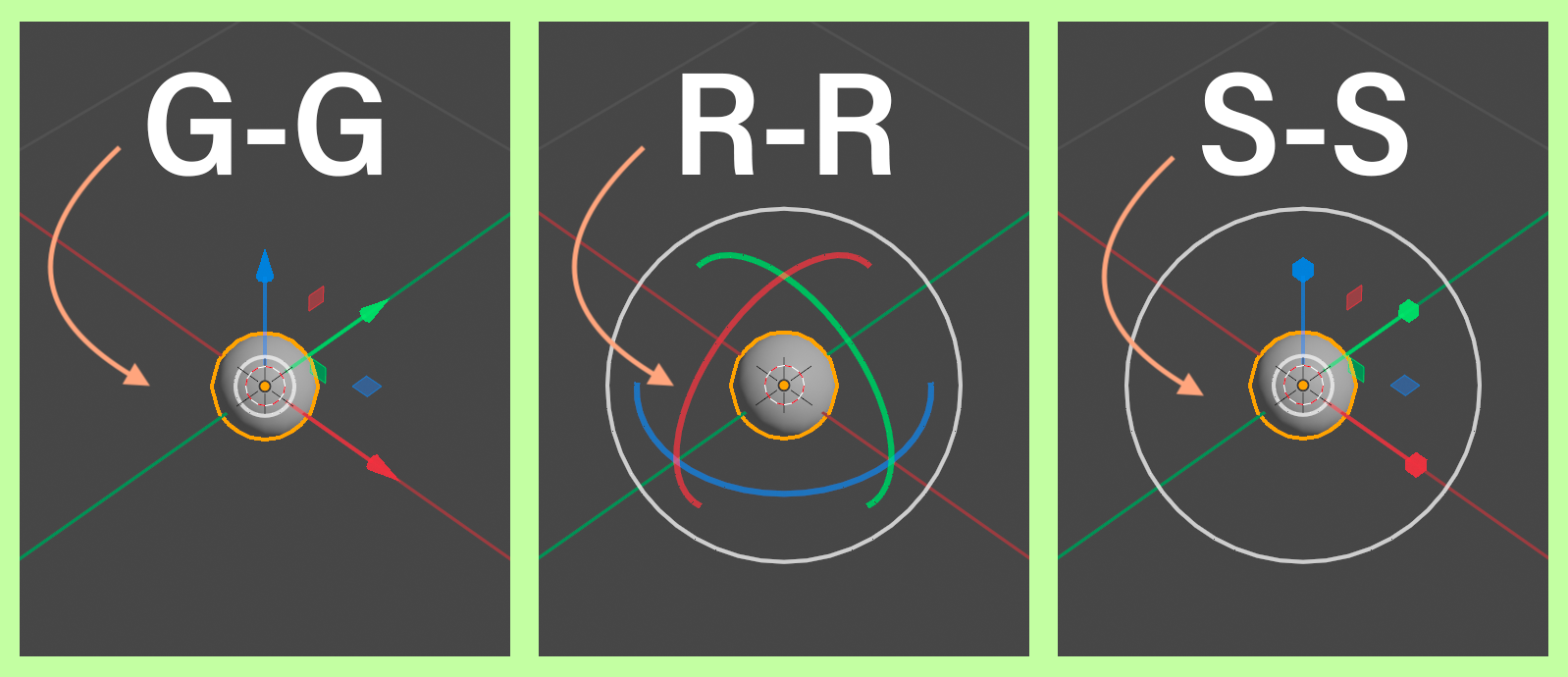
My suggestion is to activate the gizmos by double-press g/s/r. When you press "G" it will act like you are used to. Pressing "G-G" will activate the move gizmo. So everything can stay as it is now but people that prefer to work with the transform gizmo have an option to do that fast and efficient. (Ideally with an option in the preferences to make it work the other way around.)
31 Comments
There is a new (free) add-on that solves this problem, and rather elegantly too: blendermarket.com/products/gizmodal-ops
I have been using it for animation almost daily for almost two months now, it's actually pretty good. There are some rough edges and some feature losses here and there, but it remains overall pleasant to use.
Oh my god, I'm SO happy to hear this feedback! Hey, feel free to pass on any issues you have at the Gizmodal Ops github page (I'll leave a link below), and if you can ...tell others.
This was a passion project of mine, and it's hard to convince other people about how useful this add-on is. It feels like it's the missing link for Blender users. Any work Blender Defender and myself can do to improve it, we will. And thanks again for your feedback. Much appreciated! :D
By the way, one last thing: You mentioned feature loss. There shouldn't actually be any. RR and GG still work, as well as Move, Rotate, Scale all locked to view plane. (You just have to hold down G/R/S and move your mouse to enable this feature).
github.com/BlenderDefender/Gizmodal-Ops/issues
Coming from Modo this is a life saver. But what if I use a different short cut like W for move? Where can I change it on the addon?
Easy!
Go into Preferences and change the Key Binding for Move from G to W.
Gizmodal Ops then recognises the new key binding.
Why not just having an option in the prefs to make it toggleable? It could replace the current alt key modifier option that is pretty useless imo. So the gizmos could appears and change each time a shortcut is pressed :
This principle can be applied to any tool
* @Shimoon * that sounds nice indeed
Just turn off this useless gizmo...
* @IIIFGIII * Good for you when you don't need it. Seems like you never animated a rigged character. It's not about what's the better way to work here, so I don't get the point of your comment.
* @franz i. * I doubt this kind of change can be applied, not today at least. It seems too much of a change to be adopted by the masses.
Besides, I think it would be easier to use other solutions, like switching to industry standard keymap (handicapping for modeling, but not so much for animating and a lot of free space to customize) or edit your own keymap.
* @IIIFGIII * Useless? Soaked in hyperbole are we? Let's take a breather eh? ;)
Default G,R, and S are great and I use both, but I agree with Franz here that particularly for animators, gizmos are super important. Often times you'll have several controls with different rotation orders, and to make several single-axis quick adjustments, gizmos make life much easier. Keeping your curves clean by adjusting on the axis you need (and quickly, without memorizing each axis for each control) is essential to animation.
Different workflows and different tools for different peeps. :)
* @Alex * Useless. Slow as turtle, and limited... I come from Max, I know what is " gizmo workflow ". Who know nothing but this gizmo jerking - can't get the point.
* @IIIFGIII * I started with Blender and have been using only this one for years. I consider animation is way more fluid using gizmos, and everything else better with modals.
So we stuck with two opposite opinions, what should we do?
Are you a professional animator? If not, please remain silent and do not impose. What is the reason you said it's slow? The default operations of Blender it usually takes 2-3 operations each time when in reality we only need to use it once with Gizmo. Is your point that 1 > 2?
G-G, R-R and S-S are already used to switch betwen global and local transform orientation by now. So I think it takes an other approach. Alltough I also miss a direct shortcut to acessing the transform tools / the gizmos. It is though an easy way to show the gizmos by the "viewort gizmos" menu and give them own shortcuts but it is not that elegant I think...
* @Eno Kahl * Ctrl G, Ctrl S, Ctrl R sounds better
* @AnityEx * ctrl+S? hehe I wouldn't advise changing that one...
* @Yegor R * dang you right
* @AnityEx * ctrl+G? I wouldn't advise changing that one either..
This exists already, as you mention. If you want more direct hotkeys, you just rightclick the tools and choose 'Assign Shortcut'
THANK YOU <3
we really need an option to switch the gizmo it's driving me insane
every other 3d software is using just a gizmo
Hi overdev, you say: Blender really needs to switch the Gizmo. I totally agree, which is why I made this free add-on. It does exactly what you're asking for: blenderdefender.gumroad.com/l/GizmodalOps
Many thanks, this is fantastic. I've grown weary of Blender's object control, which often requires threefold effort to achieve the same movement or rotation during animation, as opposed to the streamlined approach of using the gizmo.
Thanks so much for your wonderful feedback, minh. I'm delighted it's helped! Huzzah! :D
Also animating rigs, I just rebound G R and S to the gizmo equivalents and bound the OG blender tools to Alt-G, Alt-R, Alt-S. Not sure if that'd work for you though?
gg, rr are already mapped to very useful functions, gg is to slide element in edit more, and rr is free rotation, i for one is a modeler and always switch off the gizmo since blender 2.5. interest to see your perspective as an animator
Gizmodal Ops (the free add-on) allows for RR and GG commands. Give it a try, you'll like it!
blenderdefender.gumroad.com/l/GizmodalOps
It's basically what the industry compatible keymap does by default
I actually was pro GRS for a while, but after watching a video from both an 8 year Maya animator trying Blender for the first time, and someone who does modeling with the industry compatible keymap, I've preferred using the gizmos At first, only for object and pose mode, but recently, I swithced to WER entirely for edit mode, and the other areas as well.
GRS is slower to set up, because not only are the keys not right next to each other, you have to press more keys to do the same thing you can do better with the gizmos.
Because of this, it's not good for animating, because you never want to move on all 3 axis at the same time. (ESPECIALLY not with the camera)
And again, you have more key presses, whereas with the gizmos, it's less work.
@ davideugenerozierjr - Correct, however... look a little closer and you'll see that the Modal Operations are still intact also. This is a huge boost to the industry compatible keymapping that other programs use. You're essentially getting the best of both worlds by using Gizmodal Ops.
One more thing, Gizmodal Ops survives alternative keymapping, so you can use it with your WER setup if you prefer.