
Allow Spacebar to Move Selection Marquee
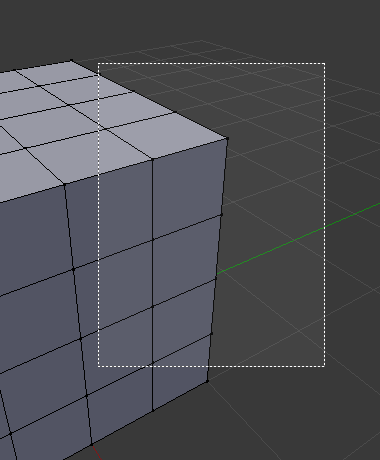
In Photoshop, when you use the box marquee selection you can move the entire selection box before you commit by holding spacebar and moving the cursor. It would be very useful to be able to do the same when dragging to select with Blender. As far as I know, spacebar is unassigned when drawing a selection box.
9 Comments
This is great, specially in sculpting...
Oh man, essential for correcting selections and shape placement <3
Maybe a nice-to-have, but I'm not sure it's as critically necessary in 3D as it would be in 2D. In a raster application like Photoshop, selections often have to be pixel-perfect, so it makes sense to have controls to massage your selection. That's a far less common thing in 3D space where the things we're selecting are much larger and don't require that level of accuracy.
* @Jason van Gumster * May not be critical, but would be nice nontheless. With spacebar unoccupied while selecting there's no harm done. There's been occasions I've desired it, especially in ortho views. Adjustment before commitment is rather useful.
I've encountered 3 industry software that does this (3D Coat, Photoshop, ZBrush), so it's one of those features you sort of "expect" for completeness. Not having it there didn't make much sense to me.
* @Jason van Gumster * not critical, but trivial to implement and very useful. Also, as sculpting gains more popularity in Blender accurate selections (for masking) are definitely critical. when zbrush added this feature it was a game-changer for a lot of people.
* @Jason van Gumster * I’d like to put it stronger: adjusting a rectangular selection makes perfect sense in a 2D pixel world where image pixels are perfectly aligned along those rectangular axes. In contrast, 3D vertices are hardly ever aligned along the same grid. I’d say that a boolean intersection modifier in combination with an axis-aligned box is a better fit to the modeler’s need.
Nevertheless, it might make sense to shift a selection much like we can already grow or shrink it using hotkey “+” or “-“. Shifting would occur in object tangent space or whatever coordinate space is active. It should be relatively easy to implement as well since one only needs to project the edge directions agains the space unit vectors.
:) Can you imagine what happens when you shift your selection around mesh corners? A left-shift would ‘clamp’ the selection to the sharp corner where the mesh bends and continues towards the right. I can image that such would mostly confuse the regular user.
* @Ivo * Huh... now that is an interesting idea. Probably worth a separate post of is own.
* @Ivo * The issue isn't that 3D elements usually aren't in a grid pattern. The issue is that sometimes you will start a selection and realize you need to back off to a couple of vertices behind the start corner of the selection before you commit. Like @testure mentioned, this is also useful in masking for sculpts. This feature in 3D Coat and ZBrush is very useful. It's just a convenience feature. What you're mentioning would be nice too...although fundamentally separate to my proposal.
I understand, and following up to * @Jason van Gumster *'s suggestion, I did make a separate proposal. So please consider * @Logan Preshaw *'s suggestion as a separate one to my own. Thank you for the heads-up.