
Implement "Wire Width" feature for Custom Shapes/Widgets' Empty Objects also
For Rigging, Empty Objects are usually very nice because they are super simple to use and cost-efficient...
However, I've ended up finding out the relatively recent, great development, of the Wire Width property, for the Custom Shapes Sub-Panel < Viewport Display Panel < Bone Tab < Properties Editor, is not working with Empty Objects unfortunately.
This frustrates artistic Rigging in Blender, and it makes the use of Custom Shapes/Widgets inconsistent with the Wire Width utility and potential.
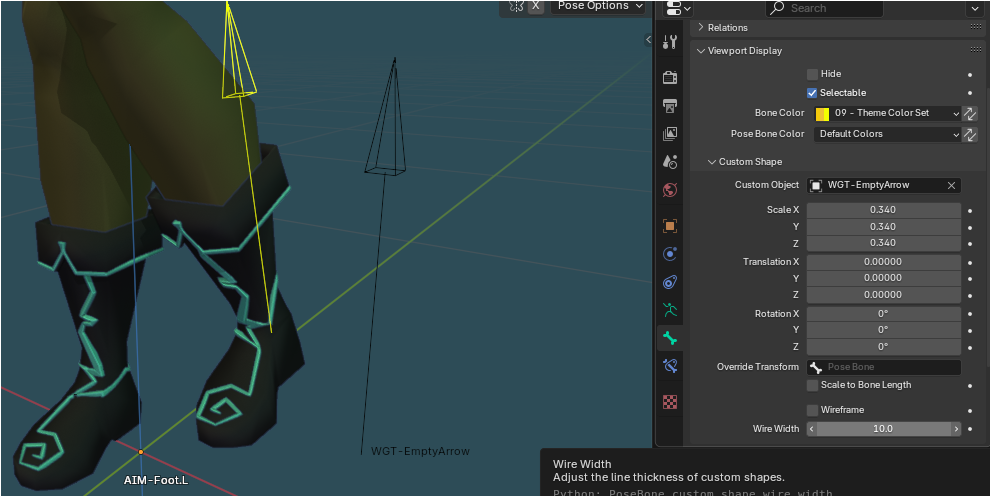
Best regards. Pxy-Gnomes
5 Comments
hey developer here. This is a limitation that has been fixed in 4.4
Fascinanting; and thanks, bro! I didn't know yet, even though I already was using Blender 4.4.0. The good (quality of) life.
Btw, could anyone make this "Done" status? Or should I tag some admin?
Is this a "flaw by design" or a bug? I would check the bug tracker if I were you, and post a bug report if nothing is said about it, to be sure from the devs which one it is. If it's supposed to work, it should be fixed it asap.
Interesting approach. Since the issue is already fixed for Blender 4, I rather ask you, for future cases:
What would be that 'bug tracker' in Blender? I only know these: Info, Python Console, System Console. Thanks, bro.
It's not an editor in Blender, it's the platform on which the developers work on Blender and, among other things, gather bug reports:
projects.blender.org/blender/blender: The official Blender project repository.
It's easily accessible from Blender using the menu Help > Report A Bug, which pre-fills the bug ticket with your system's and blender build's info.