
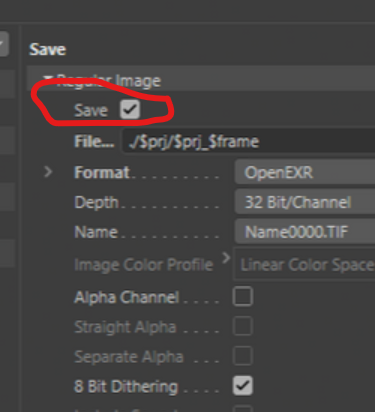
Save option Checkbox in render path
Hello everyone, let me explain this improvement. In Cinema 4d we have a checkbox to save files or lose files if it is unchecked.
In Blender we always save files in the TEMP folder, even if it is just a test. Our TEMP folder is full of unnecessary files if you just want to preview the screen.
Another very confusing thing happens if you check "use nodes" in the composer editor. If I have an output file node, why do I also save it to TEMP?
Did I explain myself well?
2 Comments
Not particularly, no.
Instead of telling us what blender does right now, also tell us exactly what new feature you would like to be added and how the behavior would be changed.
I think if we have a checkbox like cinema 4d, we have the possibility to save or not a file in temp folder or whatever folder.
Sometimes I just need to see an adjust in render window. If there is a previous render in a folder (changed /temp\ to another path) I will replace a file from my old render. I would like keep intact my old sequence.
-if I have checkbox option, I uncheck and do my adjusts without lose nothing.
-If I use /temp\ (in path) and (uncheck), no files are created in temp folder.
-If I check "use nodes" in the composer editor, and insert a file output node, automaticly uncheck a save file in output (in printer tab). You can click (on) again if you like. In my workflow, often, if you have a file output node in the composer editor you don't need another save file.