
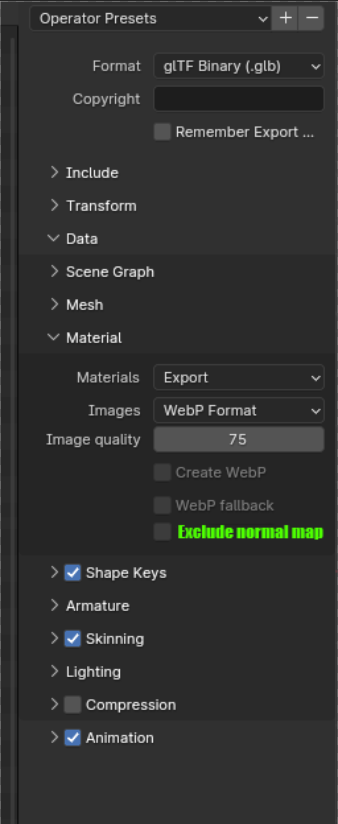
Option to exclude normal map of texture compression on GLB export
I LOVE the new webP compression option when exporting to GLB and GLTF. Unfortunately it messes up the normal map of models extremely, even at very low compression rate.
But mostly ONLY the normal map. Would be great to have a tick to "Exclude normal map from compression".
Thanks for looking into this!
4 Comments
GLTF is not made/maintained by Blender Developers
Its made entirely by khronos, so feature proposals and issues should go here:
github.com/KhronosGroup/glTF-Blender-IO
Thanks!
I work a lot with .glb for webviewers and indeed I would rather prefer to have this in the export than convert all other maps before to jpg or webp and use the auto format just to keep normal as png. Png 8bit/channel is far from great as a Normal map but it's the best available option and is the most important for the look of the objects in this use case.
Not sure this is a good usage of that tool to begin with.
Actually, that reminds me of this 6y old video:
Bit Depth & How Compression Affects Normal Maps - YouTube
Compressing the normal map isn't necessarily the issue, it could be a matter of using different options for specific maps (displacement maps could use the same treatment, sometimes people also use high bit depth albedo with emission inside, etc). Different compression algorithm, quality/level, with or without dithering, bit depth, ... And it gets even more complex when you do channel packing as well.
Right now the only way to do that in Blender is to edit the image as we need with a third party software like Photoshop or Krita, then import them back to Blender.
And if exporting to glTF (or any other exporter that offers options to compress images), disable image compression on export.
IMHO the actual thing we lack here isn't an option in one specific exporter. It's tools in Blender to handle images semi-automatically. It would be awesome if we could have a tool that can export a bunch of textures from selected materials according to rules-per-maptype.