
Make going to edit mode Quicker
Hello Blender enthusiasts,
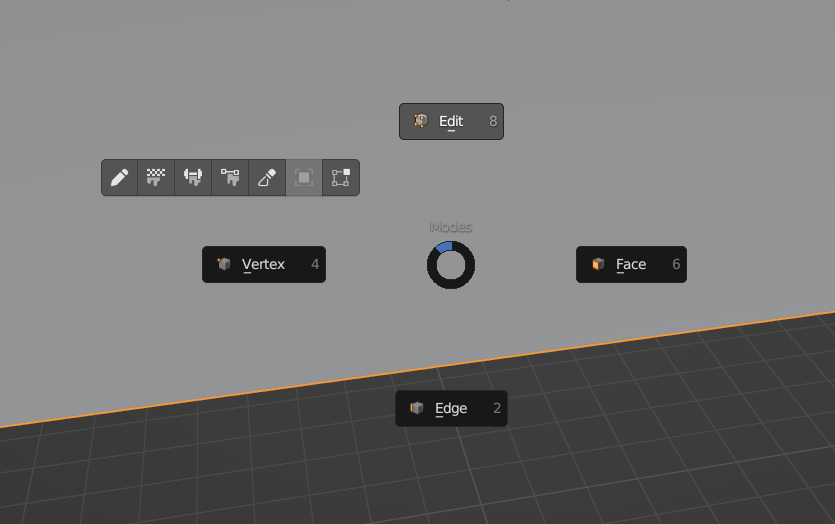
For some time, I've been using the Machin3 Tools addon for a specific reason: the popup menu that appears during modeling. Let me explain.
Imagine you want to move an edge. Okay, you press Tab, then 2 to enter edge mode, click the edge, and finally, press G to move it.
It's not only easier and quicker but also more intuitive to display a small menu for "Edge, vertex, face, and object mode." This way, you only need to press Tab => Select what you want => Start editing.
Another advantage is that it will be more intuitive for professionals using similar selection methods in programs like Maya, as well as for newbies just starting out. Even changing views with the numpad becomes more comfortable, since you don't need the numbers to change the editing selection. The modeling speed increases significantly, and It feels more close to the philosophy of "the program must work for you, and not the other way around".
Please consider this suggestion, and for those unsure about the idea, download the free version of Machin3 Tools to try out the popup menu. Let me know if your modeling becomes quicker or slower.
Thanks for reading!
6 Comments
Pie menus take 3 inputs. Tab, move mouse, release tab. I'm pretty sure I can press Tab and 2 before you can make those three inputs. Also, with hotkeys it's only 2 inputs if you need to change the selection mode. So, on average with 3 selection modes, hotkeys is 1.666 inputs, but that's assuming that all selection modes are used equally. I use vertex mode the most, so it's less than 1.666 for me. That pie menu will always take 3 inputs. I'm not sure how it can possibly be faster, since on average it takes twice as many inputs.
I also don't really know what you're talking about with changing view on the numpad, unless you don't have a numpad and are using numpad emulation? Personally, changing views is too important for me so I remapped all view changing to extra buttons on my mouse and keyboard closer to the left side. Much faster. Also, even if they add this pie menu, the number keys are here to stay since we'll still need a way to change the selection mode while in edit mode.
If you haven't had the chance to explore both methods, it may sound like '3 inputs equal slower.' Yet, it's essential to consider the human factor. When you're modeling, you don't press 'Tab' and then quickly hit the number '2' as if it were a race, for example. It might take up to three seconds, especially if you press the wrong number, which can happen. I've even found myself sometimes clicking on the edge and vertex modes in the menu instead of using numbers, especially after a long day of modeling. There are times when you look at your keyboard to press the number correctly, or you find yourself with awkward hand positions, pressing '1,' '2,' '3' too much when it's really not necessary. This is crucial, considering it's not just pressing 'Tab,' '1,' '2,' '3,' or whatever. It's more like: 'Tab,' '1,' 'G,' 'Z,' 'Y,' '3,' 'X,' 'Enter,' etc. With this pie menu method, I never click something that I don't want, my eyes can stay on the screen, and it's faster. It takes way less than half a second to change the selection, it's more intuitive, and it's faster—speaking from my experience of trying both methods over time.
Regarding the final line about the number keys, I wasn't quite clear on that. However, I can confidently say that I've transitioned away from using numbers for editing; I only use them for changing views now. They just don't feel necessary for my workflow anymore.
Practice makes perfect.
It's not just about practice; it's also about efficiency and being an intuitive 3D package. I won't bore you with my experience, but I've modeled extensively, not only in Blender but also in Maya, 3dsMax, ZBrush, etc. In the studio, we transitioned from most Autodesk programs to Blender, and now we all use this addon specially because the pipe menu ! And believe me, we care a lot about being efficient. Out of curiosity, did you try this method? Or you only tried the 1,2,3 way of modelling?
I'm saying practice will make you more efficient, and hotkeys are faster than pies so if you just get better at using a keyboard then you will be faster with 123. It is very rare for me to accidentally hit the wrong number key, and it never takes me "up to three seconds" to change to edit mode and change the selection mode.
How intuitive something is is pretty subjective, and we could be here all week debating about it so I'm not going to.
No, I haven't tried this method, but I've used plenty of pie menus in other areas of blender and I hate them. I'd much rather just press one or two buttons to do what I want instantly instead of having to move my mouse during the input. Pie menus are only acceptable when you have too many options to make them all hotkeys, and/or when you don't use the commands enough to make them worth hotkey real estate. Changing the selection mode doesn't fall under either of those categories, so I'd like to keep it to one input.
The 3 seconds was in the worst-case scenario; obviously, the common thing is to press the number correctly, and you can do that easily with just a week of touching Blender! However, when you model a lot, you also make a lot of mistakes. As for being intuitive, it's not entirely subjective. Pressing 'Tab' to go into edit mode and finding the type of selection you want versus pressing 'Tab' and having to press a number to enter face or edge mode or whatever – there's a difference. I encourage you to ask what's most intuitive for Autodesk or C4D users.
When pressing numbers, it feels like I'm playing the piano on my PC's keyboard: Shift+A, Tab, 3, G, Z, etc. Just look at your fingers while doing that. Sure, it's possible – many workflows are possible! Even when playing the piano, in the sheet music, you need to position your fingers efficiently. Yes, you can play it with the wrong fingers, and it will sound the same, but it's also about harmony and not breaking the rhythm, which exists in every creative process, such as modeling.
I encourage you to try the addon for the Pie menu, at least for 10 minutes. If you're willing to be brave for two weeks until you get used to it, you can then share your experience and tell me if you are quicker, slower, or whatever. It's challenging for me to argue with a user who hasn't tried the method and still claims that it is slower.
I understand that everyone has their preferred workflows, and I appreciate the efficiency you find in the current method and I'm sure you're fast :), but It might be worth giving it a try for a short period and then sharing your thoughts.