
Extendeable 3D Cursor
After the improvements that the 3DCursor has received in the new version of Blender I have been wondering if it could be improved even more, and acquire more functionalities.
I made a suggestion in this thread, developer.blender.org/T54950 But I think I was not very concise.
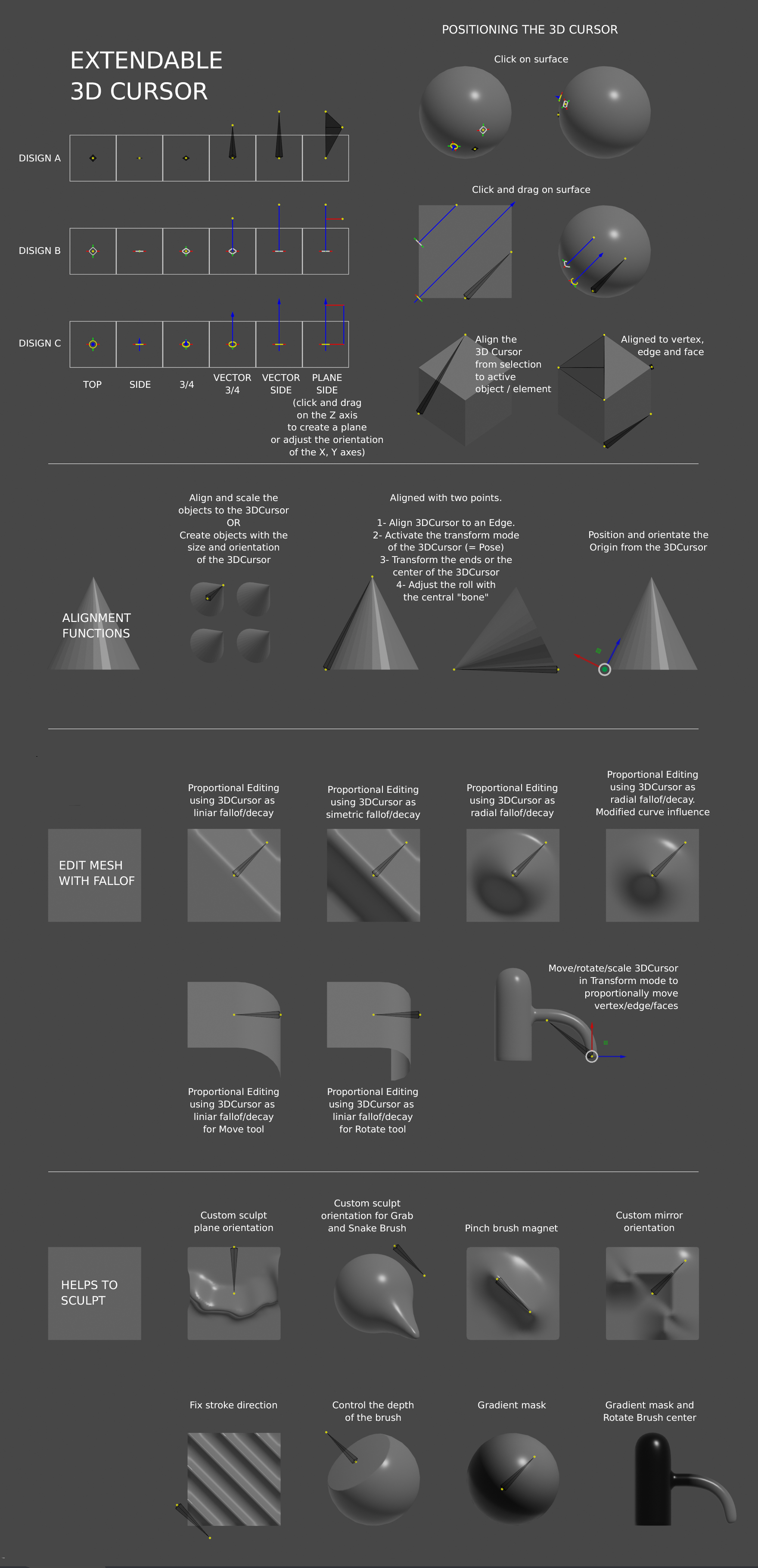
The fact is that I think an extensible 3DCursor, could add more functions and make it more useful in the sculpture and painting modes. I think that if the 3DCursor had head and tail could be used for more things, such as the ZB Transpose Tool or the Modo Linear Fallof Mode. At Blender we already have Mira Tools's Deform Mesh that does something similar. plus.google.com/+MarvinKBreuer/posts/PQPrBYaRhLt
To provide some functions to the 3DCursor, this requires two modes, one to position it, and another to transform the objects. It is a concept that I have not seen yet in Blender, but in Maya. For this reason also, I see that the 3DCursor crosses the line from assistant to tool. On the other hand it would be a permanent assistant / tool, so even I do not have clear that it is the best option.
I leave a capture with various options that I have been collecting, although I think some are extensible to other modes, even for Grease Pencil.
Right now I think it could be used to distribute objects in a row or grid, which I have not added.
6 Comments
Hi, similar can be done through the modifier hook. Just convert the unmasked area to a vertex group and use the hook modifier. Example youtube.com/watch
Wow! It's true, thanks. I know the modifier, but I had not associated it. It happens the same as with the Lattice, in Max he always used them, but not in Blender, because of all the preparation. Maybe it would be convenient for the Hooks, create the Empty and paint the weights, from shuttles from the own modifier. What I have noticed, is that the interaction of the 3DCursor that I follow resembles that of the Ruler / Protractor, which also gives an angle. Maybe between one thing and the other, it is possible to reuse code, I do not know. Anyway, I do not see any inconvenience in having a specific tool for this type of deformation, which hagilize the task. In this way, no special Mode for the 3DCursor would be needed.
@wevon: It is possible to implement the tools already available. Just added another gizmo brush in the sculpt mode where you can control the manipulator. Configure the hook modifiercan can be display in the settings of the new brush
It seems to me that there is an interaction mode of the 3DCursor extensible with the tools, which would collaterally add more functions. It is based on the interaction that the active tool Spin uses with the 3DCursor. When you activate the tool, nothing happens until you click on the screen, then the action is executed using the 3DCursor as a position reference and the manipulators are displayed. You can use the manipulators to adjust the action or click to repeat the action. In a similar way you could use the extensible 3DCursor with the tools of transformation, extrusion, cutting or duplication, for example. If the extensible 3DCursor gives a vector, a plane or an angle, you can with two or three reference points, move, extrude, duplicate or repeatedly cut one or several objects with these values. If you do not want to use the values of 3DCursor, you can always click and drag, and the tool takes the new values, or uses the manipulators issued by the active tool.
I have updated the image, and I have added an option to better control the orientation of the axes. Clicking on the central vector I think you should move the head and tail at the same time, or roll directly the X and Y axes by turning the Z, or create a 3-point plane, depending on a combination of keys. By better controlling the Roll of the 3DCursor, I think it improves the options of alignment, distribution, and could even be used as a cutting tool.
@wevon: I also think there are a lot of possibilities to use the 3D Cursor as an extra tool for the other modes. Especially using it as a kind of Transpose Tool like in Zbrush is something that is still missing in Blender and in my opinion desperately needed.