
Using the Top Row of Numbers for Collections
While I do see the practicality of the new collection system, the collections are rather slow. Instead of having selection modes on the top row numbers, I would suggest we have an easy way to assign collections to a specific number.
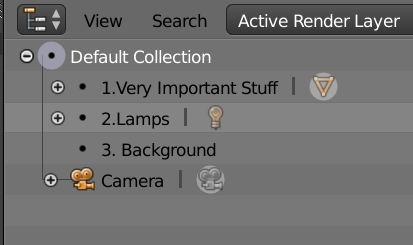
For example, I could write for collection names:
1.Very Important Stuff
2.Lamps
3.Background
Blender automatically corresponds the number in the name to the proper key. Pressing a number would then put the collection into a local view and hide everything else. This way, we could get back the functionality of the old layer system, but with all the power of the new collections.
Having the above functionality would make be awesome in replicating the behavior of 2.7. To take complete advantage of the new collection system, there could be a sticky key version which would work in the following scenario.
Outliner:
1.Very Important Stuff
___1-1. People
___1-2. Props
______1-2-1. Cupcakes
___1-3. Robot
2.Lamps
3.Background
I then type 13 which would automatically put me in the local view for the sub collection named robots. 12 for Props, 11, for people, and so on. This method could basically support infinite nested collections as typing 121 would result in cupcakes.
This of course comes with the limitation of not allowing more than 10 collections in one category (counting the zero key) and being slightly more tedious to set up.
1 Comment
This is very personal and I think everyone would use them for something different. For me, I have camera views which are very important and I don't like to lift my hand from my mouse neither move my left hand to the other side. We can all use pie menus too for anything. Maybe you could use a pie menu for that and it could be as quick if not quicker.