
Hundreds of a second view
I'm missing a view in the timeline. That is hundeds of a second.
Currently you have only two views: FRAMES witch is fine and TIMECODE (MM:SS+FF) witch is inconsistent
My suggestion is to add a new format:
HUNDREDS (MM:SS:HUNDREDS)
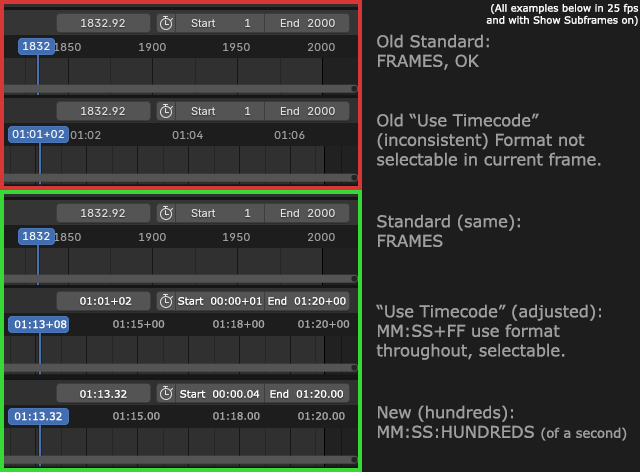
In my mock-up I've tried to illustrate this. I have enabled Subframes in all examples. The red square is the current state with FRAMES and TIMECODE respectively.
The green square are the new modes.
First: FRAME, the same as currently.
Second: TIMECODE adjusted to be more consistent where the timecode is also viewed in the boxes where you can select, adjust and copy any timecodes. With a plus sign between the seconds and the frames.
Third: The new HUNDREDS mode, where every second is separated into hundreds of a second. With a colon between the seconds and the hundreds of a second.
Working with real time graphics like Unreal, Unity, Godot and Sketchfab for example often use hundreds of a second, and currently this is not possible inside Blender. You have to go to a calculator like this ( en.editingtools.io/timecode/ ) to do you calculations between different time formats. Witch is cumbersome and inconsistent.
Hope there are more people like me in need of this little adjustment.
2 Comments
hundreds ≠ hundredths
I think you mean the latter. Aka centiseconds. Though I thought milliseconds were more commonly used?
Milliseconds are also ok, and perhaps more standard, as you pointed out.