
One collection duplicate
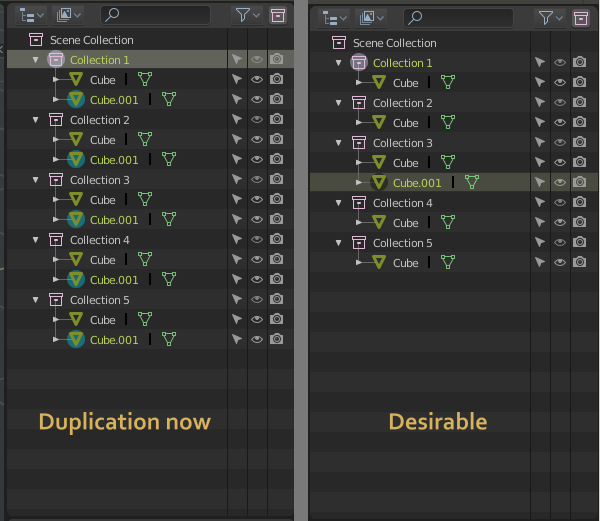
Hi all, I need your opinions. As usual, if I duplicate (clone) object, I want to have it only inside current/selected collection. And what about You? How do you instance objects to few collections?
I see solutions:
-
Default Duplicate/Clone will work local inside collection or selected collections. Additional item of menu in outliner and additional hotkey for «Duplicate to all». But only if such option checked in Preferences->Editing -> Duplicate data (collections relation). Otherwise duplication to all collections will work as it is.
-
Like in 2.79: Duplication will be done only inside visible collections (layers). But you can select few collections, press Shift+H and all other collections will be hidden, so duplicates will not created there.
How it works now: duplicate, then search by name, select unwanted, unlink from all collections except for a few . Odd way in my opinion. What do you think?
6 Comments
now it is easier to relink object to one collection with collection manager. But it is still reverting of previus action…
Just too many problems with more than one collection / group per object.
Wrong organisation concept, holding a ramp on upgrades on viewport selection, future multiple modifiers application, multiple object interventions...
* @ Okavango * yes, it is complex concept. Yes we have problems. But a lot of advantages for instansing, animation, hierarchical instancing, procedural including, mass processing (modifier for collection)
I'm not certain this shouldn't be reported as a bug!
* @ammusionist * so we need to call someone from devteam here.
* @ammusionist * I checked. In 2.79 was the same situation with layers: duplicate had same layer-relation as parent. But the problem is now we can have A LOT of collections. And do not have ability to toss duplicate into few collections at once, as it was with Layers.{attachment 100257jpg}