
Automatic compositing File Output (and more)
There are over 30 render passes that you can select. It would be great if in the compositing window there would be a tool to automatically add them all to the File Output node.
As you may know, you can only drag one render pass to the File Output node, unless in the node settings you manually add more inputs for each pass and then connect all 30 sockets, plus name them all accordingly. This is a huge amount of menial work that could be done automatically, with some style of node wrangler.
Plus, all the render passes that make up the combined pass could all automatically arrange themselves in a prefered way. Doing this manually all the time is a hassle and waste of time.
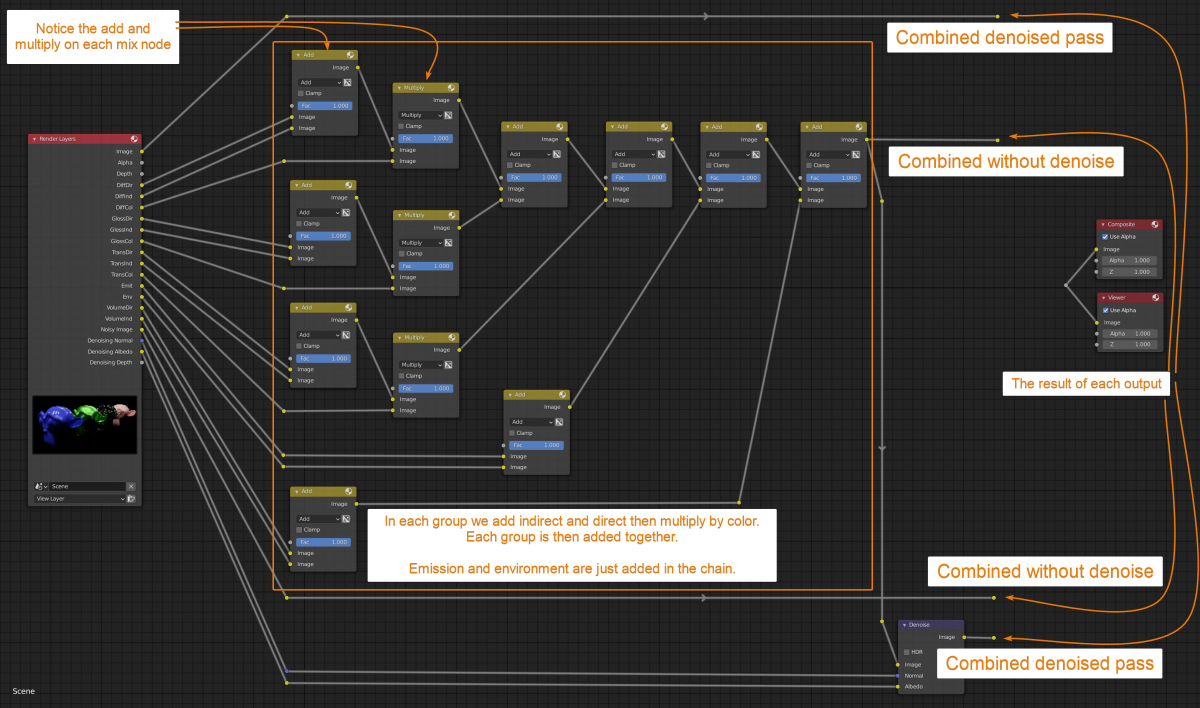
What do you think? if you don't agree, please explain in the comments, thanks!
image source: artisticrender.com/render-passes-in-blender-cycles-complete-guide/
3 Comments
What would happen if you only choose only a few passes ? This require to think about a lot of possible connection setups to think of depending of the user input passe(s). Also, there is no way blender can predict the way the user want to assemble all the different passes and you would end up with a setup that not fit 80% of the cases.
To be clear, I'm not against having a default node setup for compositing. But I would more likely prefer to link a premade setup I already did knowing that it will perfectly fit my workflow juste like @arthurbourquin mentioned or just do it as an addon rather that a builtin feature.
You can group your nodes (except Render Layers), save your file on your computer and then append this node group from this file in any other blender file.
The only limitation would be then to have de Render Layer able to be in a group... I don't know why it can't and if it is doable.
I figured I could do that, but it would be much easier if it was done by default, so that new users could also use it. I still would have to connect all render passes manually.