
Navigating and Selecting items in Outliner with Arrow Keys
A lot of times, We use keyboard for navigating items. For example, in system file explorer, keyboard arrow keys are commonly used to selects items.
In Blender currently their is no option for navigation with arrow keys. So in this proposal, I presents details about the idea, features and some benefits.
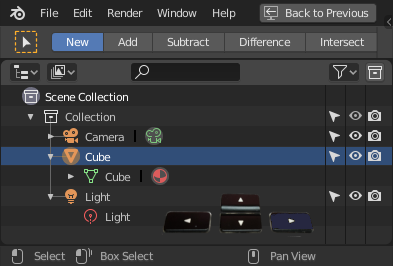
When the mouse is over the Outliner area, these controls can be implemented.
Actions Key Maps

Navigation in Action

Demo
Up & Down Arrow

Shift + Up & Down Arrow

Home, End, Shift + Home & Shift + End

Left & Right Arrow

Ctrl + Up & Down Arrow

Multiple Blocks of Selection Handling

Notes
I thinks, every minor change, can change life of artists. Often minor changes are hard to implements and requires a lot of time and brain (efforts), but for feature developers becomes a little bit references.
If you have any suggestion, comments me. I will upload it to my original post here. Let we all together make Blender the next generation tool, by adding minors changes!!!
Thanks.
1 Comment
Outliner stuff is now active on devtalk.blender.org/t/gsoc-2019-outliner-improvements-ideas/7185