
Bevel Shader - Option to bevel non-local surfaces and other improvements
Most of my experience is in Modo, and the 'round edge shader' as it's known over there is a huge part of my workflow. The addition of the bevel shader in Blender is the main reason I finally made the switch and I have no regrets.
That being said- Modo's implementation has a few additional options that would be very nice to have, for example- the ability to bevel surfaces that are not part of the same object.
Some other options that would be nice to have (I know that there are ways to get around these with some more complex shader setups, but people like me use them frequently enough to consider them as options in the bevel node itself):
- Limit bevel based on angle sharpness
- Limit bevel based on curvature convexity/concavity
- Option to control bevel radius using Bevel Weight. I imagine this would be some multiplier based on the input radius on the bevel node. IE) Radius in the bevel node is set to .1 where the bevel weight on an edge is .5, the resulting radius for that edge is .05
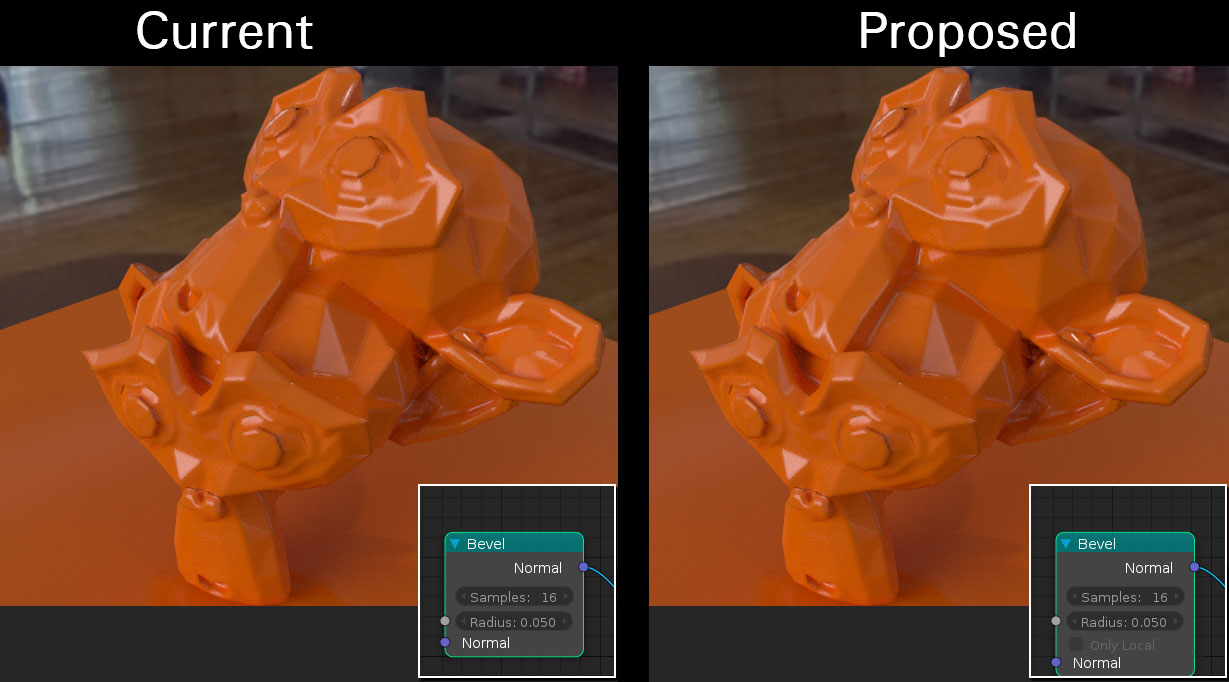
4 Comments
Would be very useful in situations where you need modifiers to apply to one object but not to another, such as subdivision. You can use Union bevels at a local level but it increases the chance of shading issues.
I made the original proposal that bring the patch... If I remember well all that things are not possible because tech limitations. So are not possible without redo a lot of work. And the improvements are few.
THe only intereseting thing is to don't have bevel in convexity or concavity and it could be do when blender will have that node.
On your first bullet point (Limit bevel based on angle sharpness): I'm assuming here (correct me if I'm wrong) that this is a threshold where anytime any faces meet at an angle greater than that, the edge is "beveled". Would there be situations where you would want other sharp edges outside of this threshold to not be beveled? Otherwise, the autosmooth setting for the object would have the same effect. Right? There are two possibilities for having separate thresholds for smooth and bevel.
If I have autosmooth set to 30 and bevel threshold set to 45, then edges between 30 and 45 would have sharp edges, but only those 45 and higher would be beveled? What would happen if you flip those numbers where the autosmooth is set higher than bevel threshold? You would have smooth-shaded edges that also had a bevel on them which would definitely be seen as a bad thing. But I also can't think of a situation where I would want sharp edges and bevel shaded edges in the same mesh. Usually I use bevel shaders (Mental Ray and now Cycles) when I want to make an item look more realisic since there are no truly sharp edges in nature.
I hope that's not too hard to follow.
As far as your main point of bevel shading between objects, I think that's a very valid point and something I used all the time in Mental Ray to make objects look like they blend together. Your other bullet points are pretty upvotable (not really a word) as well.
@dpdpforlife: Yeah, that's the general idea- though you wouldn't want it to be bound by the autosmooth angle because the whole point is to have the flexibility of having a razor sharp edge that is unaffected by the bevel shader. If it fell below the autosmooth threshold, it would just get smoothed normals.
As an example- say you were modeling a combat knife and you wanted the edge to appear infinitely sharp- but you've done a bunch of boolean operations to get those little serrations at the top- so you want those to be beveled (they're closer to 80/90 degrees because they're on the flat side of the blade). However, once it reaches the sharp taper, where the angle is extremely accute- you don't want the bevel shader to make your blade look dull.
You mention there being no true sharp edges in nature- and that's technically true if you're talking about electron-microscope analysis of objects, but there are plenty of times where I use infinitely sharp edges either to play up a certain aspect of a design, or exaggerate something in a stylized way, etc.
So yeah, the knife is a rudimentary example, there are many other use cases- and all of them would be captured by having the ability to set the bevel weight on individual edges, but for fast concept design being able to do it via angle weight is a great time saver for the same reasons autosmooth was added to the object properties, you can go through and mark sharp edges all day long but sometimes it's faster and easier to just set the angle.