← All ideas30 Oct 2018corelista.comOpenSculptingcorelista.comAnthonyGuiziouBabaJanDraiseGL-GraffixxLillyaRemakeSPYReoxangelbpinedaaryeramatybnzsdaviddlfondbekhoucdpdpforliferamchitrakumarsamuel.santostheobairon16vertexpainter
The four urgent improvements for Blender 2.8 to win more professionals in digital sculpture
81%
Development Status:
Open
Upvote17Downvote4
c
corelista.com
30 Oct 2018
12 Comments
B
Belich
this is not a bug, this is how the relation object and data works.
If you sculpt or use any operator in edit mode, the operation its being done in the data, then the object scale multiplies that result.
Thats why an objects should be always 1,1,1 scale, unless some especial situationes requires something different, for example motion graph animations.
c
corelista.comAuthor
@L. Nahuel Belich:
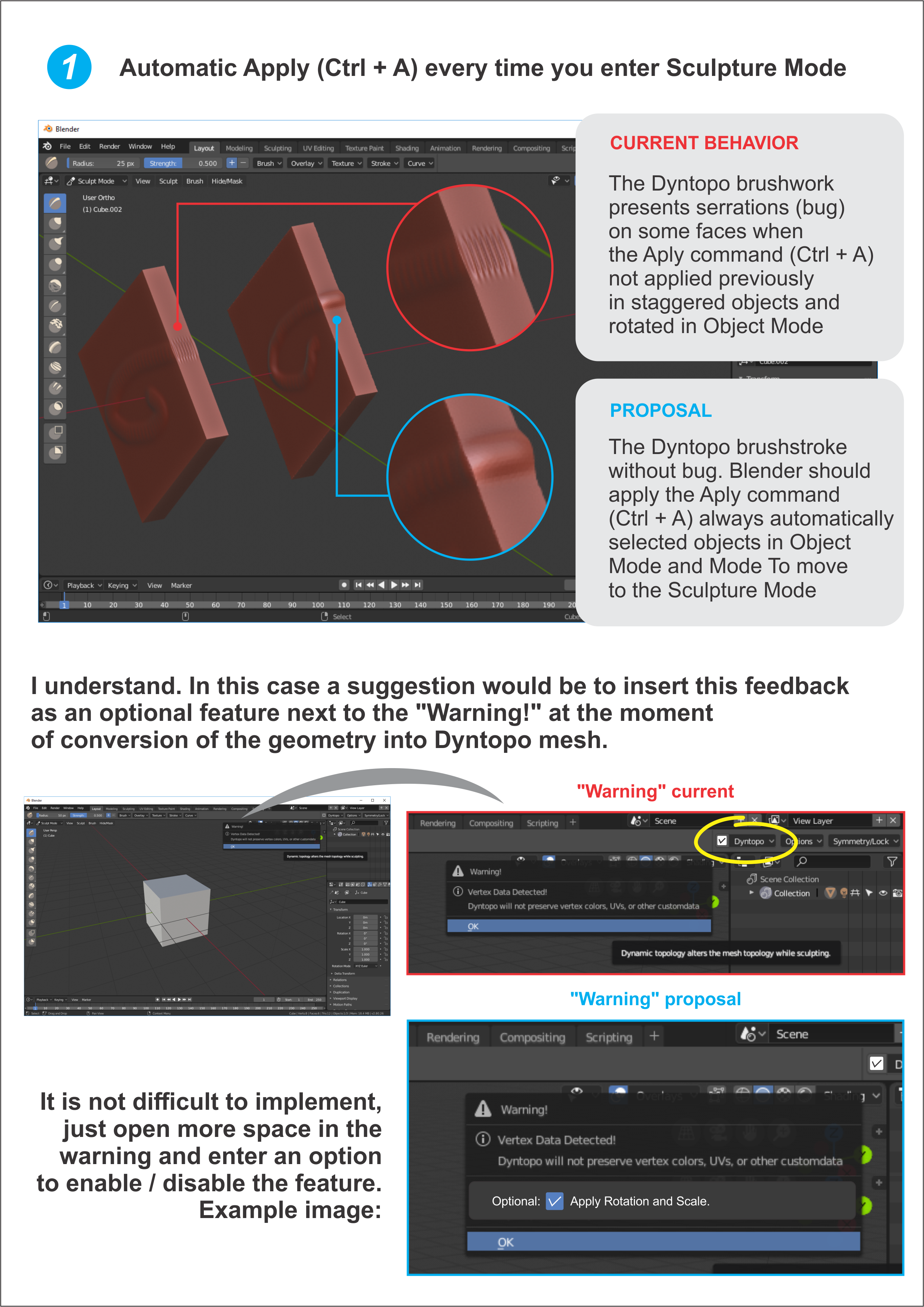
Okay. I understood what's involved in the way Blender was designed. That is why I reiterate the suggestion to make the life of the sculptors easier. Please, add next to the "Warning!" of geometry conversion in Dyntopo mesh an option that allows to enable / disable the "Apply" feature. Example: Optional: (_) Apply Rotation and Scale.
Suggestion is a very simple thing to implement, it's quite true. But that makes life much easier for users who, like me, are switching between Zbrush and Mudbox for Blender 2.8.
B
Belich
@Corelista:
a warning next to dyntopo actually won't be the solution, the "problem" still remain in standar sculpting, modifiers and operators. maybe the solution here its not a core feature but an addon, that checks and apply transformations when changing modes.
c
corelista.comAuthor
@L. Nahuel Belich:
I'm not just referring to a warning, but implementing an option to enable or disable the Aply options (rotation and scaling for example) next to the same "Warning" popup window that currently appears in version 2.8 when the mesh is converted to Dyntopo. It may seem like a silly and simplistic idea, but it would be faster and more practical than decorating and remembering keyboard shortcuts.
j
jason
@Corelista:
The thing is that the option should be disabled by default. If that's the case then you run into the same situation that you already have: you start sculpting, realize something is wrong, hop out to Object mode (often undoing your work first), and then either enable the option or use <kbd>Ctrl</kbd>+<kbd>A</kbd>. So having the option there doesn't actually save much time, IMHO.
c
corelista.comAuthor
@Jason van Gumster:
Thank you for your attention to this proposal. I would like to clarify that the suggestion is to anticipate the activation of the "Apply" Rotation & Scale, so that it is not necessary to return to the object mode. It is a simple solution but it works. See above the updated image that explains the proposal better.
B
Belich
@Corelista:
you can sculpt and no use dyntopo, ¿how does this warning help the other sculpt alternatives?
c
corelista.comAuthor
If you do not use the Dyntopo then it will be necessary to work with maual subdivision of the mesh or muitiresolution modifiers to increase the mesh density to be sculpted. In these cases the problem should not appear. I have not yet encountered the problem with sculpture in subdivision or multiresolution because my sculpture studies only used Dyntopo.
Anyway another possible solution would be a warning similar to your subject appear whenever the user enters the sculpture mode, or something similar (I imagine that nobody likes avisis jumping on the screen, but sometimes it is better to warn than to frustrate expectations).
Sorry, I do not want to offend anyone. I love Blender, but I'm not satisfied that a program as complete as Blender can not solve in a more practical way something so essential for the sculpture process to go smoothly on the way.
B
Belich
@Corelista:
not offence, what im trying to put in the table is the folowing, what you call a problem or bug its the way that data its being processed, this scale thingy its going to affect sculpt tools in any way you use it, dyntopo, multires or simply a too dense mesh that has sence to sculpt, also it affects other operators.
What you are proposing only "solve" or tackle one scenario witch is dyntopo, in my experience watching development of blender its not often that a feature its apply just to solve 1/8 of the problem, that kind of "hacks" are usually managed by add ons and phyton
c
corelista.comAuthor
@L. Nahuel Belich:
I understood what is involved in the process. Nor do I want anyone to feel offended by my lack of a deeper understanding of how Blender works. I'm just trying to help. I changed Mudbox through Zbrush and after meeting Blender I do not want to go back to any other program. I want to see Blender 2.8 surprising everyone in sculpture, not just the EEVEE. Thank you all for the great comments and contributions.
j
jason
If this were to be implemented, there would
have
to be some user feedback that shows when you activate Dyntopo that the [destructive] Apply operator is being run. Depending on which facet of the Apply operation you run (Location, Rotation, Scale, Visual Geometry to Mesh, etc.), it can irreversibly change your mesh in a lot of ways (like applying all modifiers) that a user may not actually want done automatically.
c
corelista.comAuthor
@Jason van Gumster:
I understand. In this case a suggestion would be to insert this feedback as an optional feature next to the "Warning!" at the moment of conversion of the geometry into Dyntopo mesh. It is not difficult to implement, just open more space in the warning and enter an option to enable / disable the feature. Example: Optional: ( _ ) Apply Rotation & Scale

12 Comments
this is not a bug, this is how the relation object and data works. If you sculpt or use any operator in edit mode, the operation its being done in the data, then the object scale multiplies that result. Thats why an objects should be always 1,1,1 scale, unless some especial situationes requires something different, for example motion graph animations.
@L. Nahuel Belich: Okay. I understood what's involved in the way Blender was designed. That is why I reiterate the suggestion to make the life of the sculptors easier. Please, add next to the "Warning!" of geometry conversion in Dyntopo mesh an option that allows to enable / disable the "Apply" feature. Example: Optional: (_) Apply Rotation and Scale.
Suggestion is a very simple thing to implement, it's quite true. But that makes life much easier for users who, like me, are switching between Zbrush and Mudbox for Blender 2.8.
@Corelista: a warning next to dyntopo actually won't be the solution, the "problem" still remain in standar sculpting, modifiers and operators. maybe the solution here its not a core feature but an addon, that checks and apply transformations when changing modes.
@L. Nahuel Belich: I'm not just referring to a warning, but implementing an option to enable or disable the Aply options (rotation and scaling for example) next to the same "Warning" popup window that currently appears in version 2.8 when the mesh is converted to Dyntopo. It may seem like a silly and simplistic idea, but it would be faster and more practical than decorating and remembering keyboard shortcuts.
@Corelista: The thing is that the option should be disabled by default. If that's the case then you run into the same situation that you already have: you start sculpting, realize something is wrong, hop out to Object mode (often undoing your work first), and then either enable the option or use <kbd>Ctrl</kbd>+<kbd>A</kbd>. So having the option there doesn't actually save much time, IMHO.
@Jason van Gumster: Thank you for your attention to this proposal. I would like to clarify that the suggestion is to anticipate the activation of the "Apply" Rotation & Scale, so that it is not necessary to return to the object mode. It is a simple solution but it works. See above the updated image that explains the proposal better.
@Corelista: you can sculpt and no use dyntopo, ¿how does this warning help the other sculpt alternatives?
If you do not use the Dyntopo then it will be necessary to work with maual subdivision of the mesh or muitiresolution modifiers to increase the mesh density to be sculpted. In these cases the problem should not appear. I have not yet encountered the problem with sculpture in subdivision or multiresolution because my sculpture studies only used Dyntopo.
Anyway another possible solution would be a warning similar to your subject appear whenever the user enters the sculpture mode, or something similar (I imagine that nobody likes avisis jumping on the screen, but sometimes it is better to warn than to frustrate expectations).
Sorry, I do not want to offend anyone. I love Blender, but I'm not satisfied that a program as complete as Blender can not solve in a more practical way something so essential for the sculpture process to go smoothly on the way.
@Corelista: not offence, what im trying to put in the table is the folowing, what you call a problem or bug its the way that data its being processed, this scale thingy its going to affect sculpt tools in any way you use it, dyntopo, multires or simply a too dense mesh that has sence to sculpt, also it affects other operators. What you are proposing only "solve" or tackle one scenario witch is dyntopo, in my experience watching development of blender its not often that a feature its apply just to solve 1/8 of the problem, that kind of "hacks" are usually managed by add ons and phyton
@L. Nahuel Belich: I understood what is involved in the process. Nor do I want anyone to feel offended by my lack of a deeper understanding of how Blender works. I'm just trying to help. I changed Mudbox through Zbrush and after meeting Blender I do not want to go back to any other program. I want to see Blender 2.8 surprising everyone in sculpture, not just the EEVEE. Thank you all for the great comments and contributions.
If this were to be implemented, there would have to be some user feedback that shows when you activate Dyntopo that the [destructive] Apply operator is being run. Depending on which facet of the Apply operation you run (Location, Rotation, Scale, Visual Geometry to Mesh, etc.), it can irreversibly change your mesh in a lot of ways (like applying all modifiers) that a user may not actually want done automatically.
@Jason van Gumster: I understand. In this case a suggestion would be to insert this feedback as an optional feature next to the "Warning!" at the moment of conversion of the geometry into Dyntopo mesh. It is not difficult to implement, just open more space in the warning and enter an option to enable / disable the feature. Example: Optional: ( _ ) Apply Rotation & Scale