
Time for last update of viewport preview render view
I'm new to contributing anything to the blender ecosystem, so please tell me if I'm not doing this right.
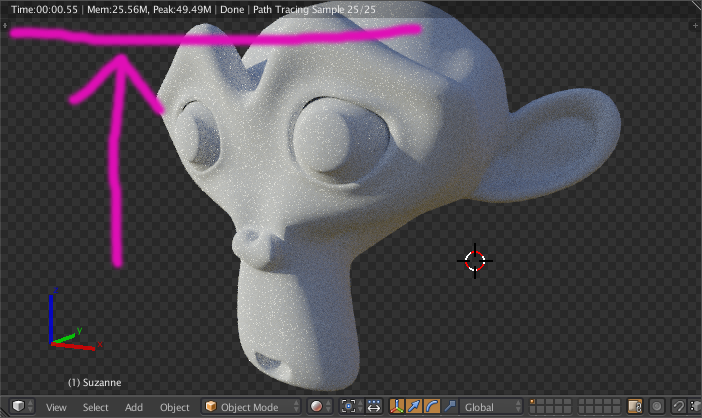
In 2.7x, when you use viewport preview rendering, there is a helpful little display at the top left corner that shows, among other things, how long the last viewport update took to render.
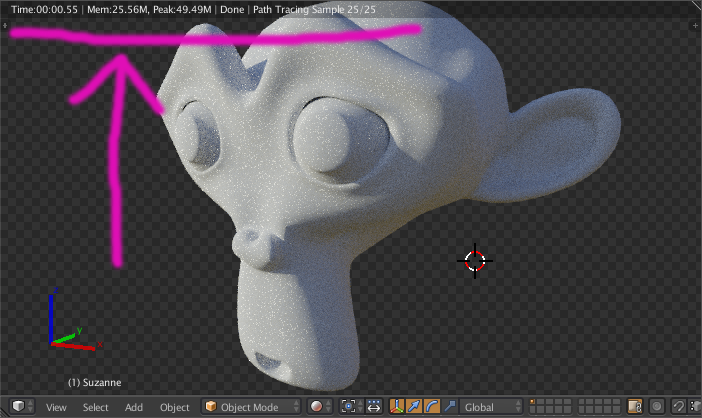
In 2.8, I don’t see anything like that in Eevee. I see something like that in cycles, but it does not display the render time.
Is there a way to get that back? Especially in Eevee, where I’m still figuring out what even affects performance. I mean, if I can’t, then oh well, but I’d really like to. I imagine the information is still there internally, so I'd think it would be easy to add that to an existing information display.
To elaborate on the reason why I think this is useful and important:
This feature was incredibly useful. The main way I used it was adjusting things like material settings/nodes and seeing the effect those changes had on the render time. I mean, I could make a change, do a test render, make another change, render again… or just move the viewpoint around and see if it feels laggy.
It was massively more convenient to mute/unmute a node (or something) and just watch the timer automatically update. Especially if it was a small sample of something that would be resource intensive. Watching a small lock of hair’s render time go from 2 seconds to 4.5 seconds is a lot easier than rendering the full thing and seeing that the time goes from 2 minutes to 4.5 minutes.
Thanks for you time.
0 Comments