
Pose Thumbnails + Quick Switch Poses

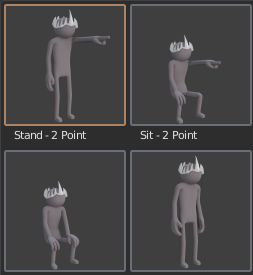
Hello All, As I'm learning Blender 2.8 I fall in love with the Poses right away! but I wish I could have a more visual way to see all the poses I create as thumbnails and a quicker way to switch with 1 click.
My Suggestion:
- Create Thumbnails as extra option on the PoseLib.
- On Thumbnail creation: Crop and maximize the image.
- Since currently DOUBLE CLICK = Rename
Instead of select and click the magnify icon to apply pose, it will be faster to just MIDDLE-MOUSE-CLICK on the Thumbnail = Apply Pose
Since I'm not a programmer, I'm not sure how it supposed to work behind the scenes, but if the thumbnails will be saved inside our .Blend file, maybe a good solution is to have a default option on the Preferences for min/max Thumbnails size, example: 64x64 / 256x256 / 512x512 etc..
I've tried to make a visual example how it may look in a very rough way, of course it can be improved for example: while the mouse is OVER a thumbnail we can see a realtime quick larger thumbnail (x2 zoom), I believe it works like that in Poser / Daz Studio but I'm not sure.
Sorry about my bad English, I hope anyone else found this suggestion useful or interesting.
13 Comments
We used something like that during Spring open movie, get it here .
It will be core part of Blender once the asset manager is implemented, it doesn't make sense that such a basic tool is an add-on.
* @Pablo Vazquez * Thanks Pablo! (the best Blender Live Host EVER! just saying). These are great news! I will give this tool a try until it will be a part of Blender.
Unfortunately, the addon does not appear in the Blender 2.8 list after installation.
* @ahrymal * yep, it doesn't. Sad.
* @Pablo Vazquez * are there any plans to upgrade the Pose library thumbnail used in Spring to Blender 2.81? Or is there a repository to download it and get it? Thanks.
* @3dcinetv * You might want to contact Sybren A. Stüvel to ask him for an update.
blenderartists.org/u/sybren/summary
twitter.com/sastuvel
* @ xan2622 * thanks. I did, sorry didn't see your reply before that. I have his contact on Twitter, indeed he's updated it.
This would be very useful. It would also be great if it only showed poses that would work with the currently selected rig....or better still if it could analyse the selected rig and the stored rig, and then translate one to the other accordingly. Shouldnt be too hard to differentiate a hand from a foot using code...particularly if one bone is clicked on to indicate the head, or if the live rig's bones contain keywords (which they most likely would).
* @tibbyninja * Great idea, filtering by selection would be very useful and easy to work with with many characters, could be by Object Armature or maybe we can #TAG the poses ourselves: "Arm", "Hand", "Full Body", "Mutant" or anything we want to show only necessary poses.
But to be honest, I would be very happy with a very rough basic Thumbnail feature for start, there are many other ideas I could think of to make it even more useful. :)
Great idea. upvoted.
I guess thumbnails for pose library could be a thing in the asset manager
agree that thumbinals are useful, bit there should be system that allows easily make em preperly (like fast screenshot with frame).
Greetings to all. Could someone help me on how to get the pose library and that it works for 2.8 on mac. Thank you!!