
Would it be possible to get a true Alpha Sculpt Brush?
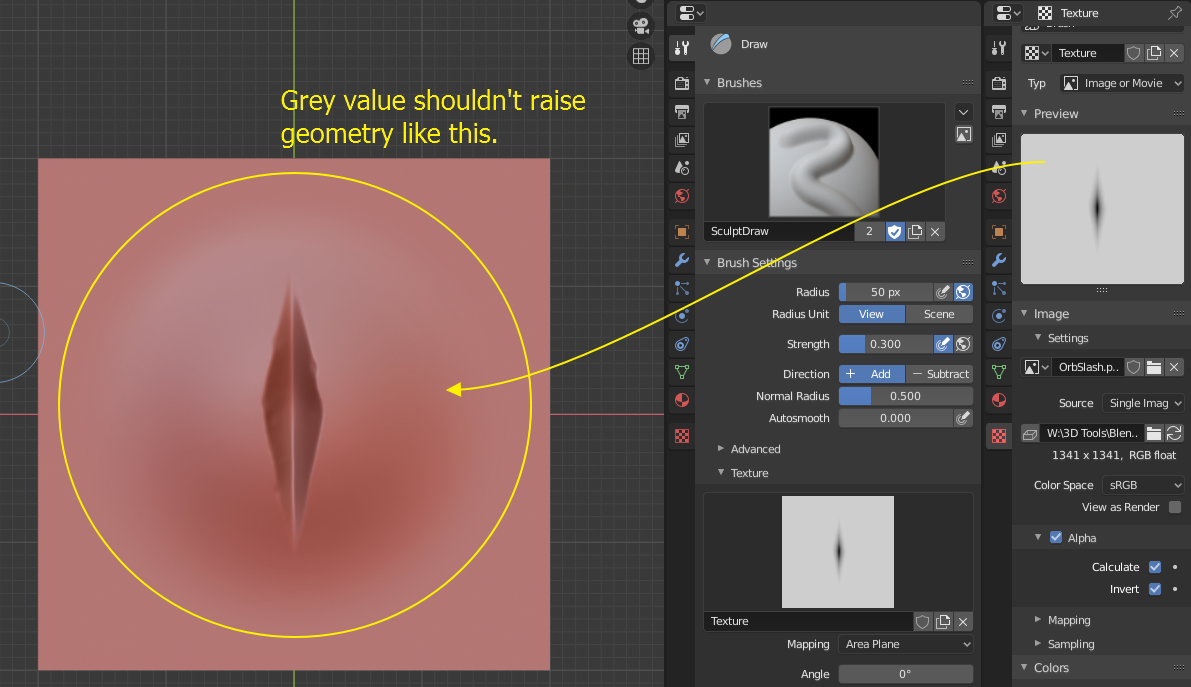
Currently all brushes either add or subtract the height value, depending on their setting and the brush texture's black and white levels, as demonstrated in the screenshot below, where I used one of Orb's brushes.
A true Alpha sculpt brush should be able to do both at the same time, with 50% grey being the "base line" and subtracting all darker values while adding all lighter values, just like hight maps work. Ideally it should be possible to select the color for the "base level", with everything lighter getting raised and everything darker getting lowered.
14 Comments
In my experience, that is exactly how it works in other programs like Zbrush. That alpha would have to be inverted (which Zbrush has a button for). If you invert the alpha, it'll work as intended. (just set to sub instead of add when sculpting)
* @devorecjd * Actually, Zbrush has exactly that feature that I described. You can change the mid value of an alpha texture, so it behaves like a height/displacement map.
nice idea
Would be cool to have a brush not dependent on just one direction.
Current texture Fix for ORB brushes: You'll have to set the Sample Bias to -1 in the mostly white textures. Set the brushes texture. Underneath the texture, you should see offset/size/sample bias. Change the sample bias to -1.
Still, this doesn't allow Positive and Negative to run simultaneously. However, this will fix the mostly white ORB textures. Just so you don't have to fix them in a photo editor.
* @Rodger Davis * ^
* @rc12 * I apologize if this is an off and unrelated question to the issue but since I can't seem to figure it out on my own can I ask how do you pull and have the texture displace from one point like in the attached video?
Edit: Figured it out - anchored stroke method. Apologies again for spamming the thread.
* @Rodger Davis * Thanks for this workaround. I never tried to set the Sample Bias to -1 because I thought it wouldn't be possible. And yes, fixing brushes in image editors is the most annoying part, since it takes quite a few attempts to get them right.
* @metaphorset * A while back I downloaded a pack from blendswap. However if you reset the brushes, it will unassign the texture, current settings, and current custom icon. I still recommend resetting the brushes. Since 2.81, the brush system for sculpt has been going through a lot of changes.
So it's a little bit of a manual labor to get it all working again. But really It's just Sample bias, custom curve, custom icon.
Here is the link to the blendswap pack if you're interested. blendswap.com/blend/18735 .
Not entirely familiar with that issue in sculpt mode yet but it might help if you give more sample images to your proposal.
You've got your color-space set to sRGB. Try it again set to Linear.
* @Josephbburg * Doesn't really matter, the area around the black part gets still raised.
* @Josephbburg * It was first thing I thought ( on his screenshot sRGB !!! ), then I tried it myself and got that really it does not matter. Linear, non color, any - it give small offset when I know that in my texture is 100% perfect gray... Looks like some variable has a bit wrong value so perfect gray become not perfect :)
Somehow, I missed this:
%100 agree. Both should be possible, like displacement.
* @Josephbburg * What blender needs is a simple brush editor like all image editors have.