
Show shared edges and vertices in UV Edit
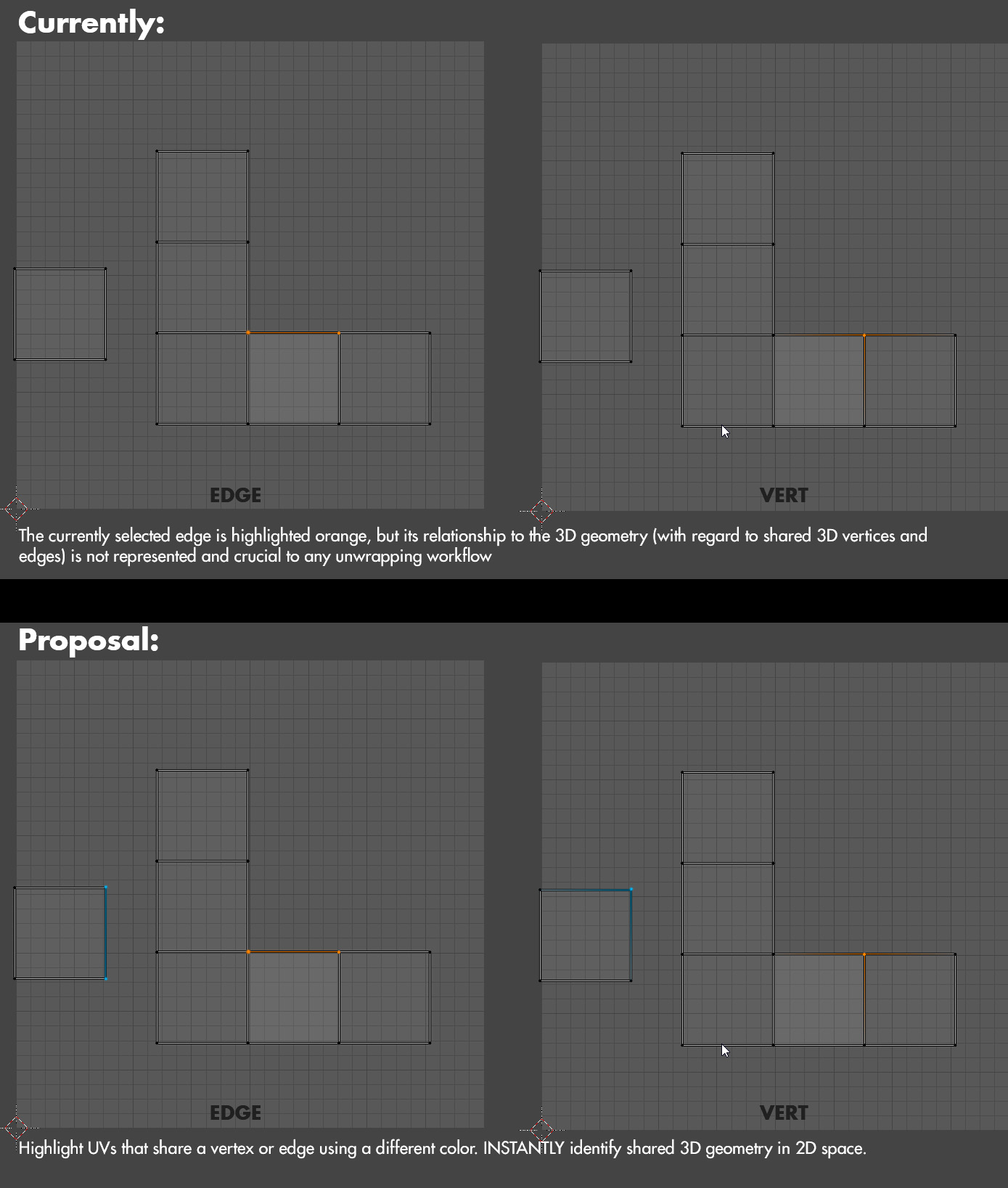
When working with UVs it's imperitive to always be aware of how the flattened 2D geometry relates to its 3D counterpart. Why then, is it such a pain to identify shared edges or vertices while in UV Edit? How often have you found yourself selecting an edge, then hitting V to run the stitch tool and see the corresponding shared edge to your selection, then right-click to cancel? Or maybe you toggle viewport sync mode so it highlights everything? Either way, it's a pain- and not intuitive at all.
I propose that in UV Edit, shared geometry should always be highlighted with a different color than the primary selection so you can always see the relationship. This secondary color would be something you could adjust in the theme settings, or even disable if you're not a fan.
4 Comments
Uvs and blender ..one Day...
Something like this would be useful.
UV overhaul is gonna have a lot of ground to cover.
I can't quite understand why this has so few votes. Noone is using unwrapping anymore?
* @cucumberer * likely that everyone knows that UV editing in blender is just super far behind at this point. It'll take a concerted effort to "fix" everything, and if history is any indication there will be a point where proposals like this one will get added to some list of improvements that could be made. Hopefully that day comes sometime soon.. it'd be great to see something in 2.83 or 2.84 since there doesn't seem to be a specific roadmap for the features they're trying to put together for that patch