
Make the camera data icon visible at all times or add new dedicated button to change views
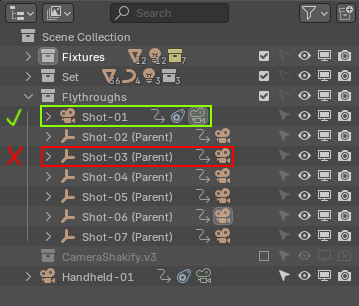
When you click the green camera icon, it switches the view to that camera. Perfect. But when a camera is a child object, you have to expand (sometimes a complicated) hierarchy just to get to it. Sure, I could think of an add-on to make this easier, but that’s not the point—and adding the feature back through other add-ons is more of a byproduct of the add-on than the actual goal.
It’s a small issue, yeah, but super annoying.
Is there a way around this and I'm missing it?
6 Comments
Honestly, I think you typed the best way to deal with it - there's several addons out there that allow quick bookmarks, camera lists, etc.
Also - I know the pic you showed might not be representative of ALL your use cases, but consider whether or not you reallyi need those 7 cameras in a collection in the first place. If not, they'd always be visible in the list.
And, don't forget you can use Filters in the Outliner to just only show cameras.
Typically, I have them parented to empties to animate more interesting movement for product videos. Your outliner idea is a good one though. I could split the UI and just show the cameras there 🤔It's a clunky workaround though because I usually need to work with the camera's parent as well. Having the camera seperated in a UI window split, gives back switching controls but now I have to juggle two views of the same thing to access different aspects of it.
Ideally, I’d still like a dedicated button or to always have it visible though.
Thanks!
Tbh i didn't even know you could switch camera view by clicking the camera data icon in the outliner... That's such a neat feature! Although, it seems to work only if you are already in a camera view. So it's a neat but hidden feature and with lots of non-obvious conditions to even work.
Having this available by clicking "any" camera data/object icon would not only help discoverability, but also make it easier to access and avoid the confusion of "why it works only with the green icon and only when unfolded?" I would even advocate for making it work regardless of whether your viewpoint ; that would equally benefit the above points.
There are so many hidden gems in Blender and this is one of the best ones IMO.
You can use camera markers. Select a camera, click on [Marker] > [Bind Camera To Markers] in the timeline and you can switch the active camera by moving them around in the timeline.
Ultimately, that still makes camera switching even more unnecessarily complicated.