
Expanding Headers to Have Multiple Rows of Buttons
Problem: Headers sometimes cannot display all of the buttons we want to see. So what if we could pull the top edge of the header up to get multiple rows of buttons?
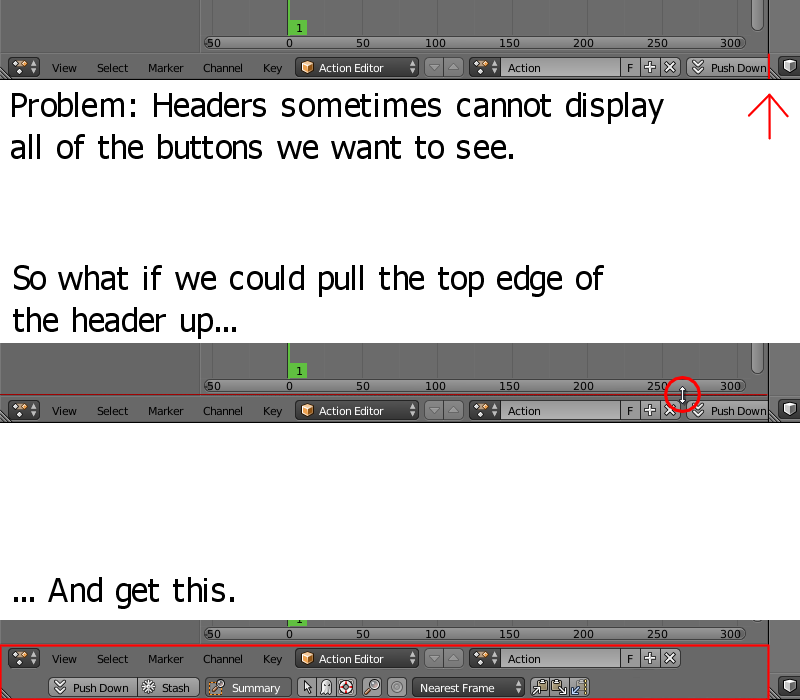
Problem: Headers sometimes cannot display all of the buttons we want to see. So what if we could pull the top edge of the header up to get multiple rows of buttons?
5 Comments
Hm my idea of a automatic switching time line (so we could leave it large) originated from this same problem. ( blender.community/c/rightclickselect/Q5bbbc/ )
I'd love this. It is pretty annoying to have to scroll the menus laterally when simply a 2 or 3 rows would be enough to display it all. Especially in 2.8 if you divide the view laterally from the middle to get 2 viewports you need to scroll both windows' top bars constantly.
Look at uv editing workspace in 2.8 for example of this. At least in my workflow I am coinstantly switching pivots and uv selection modes and both of these are in the left or right end of the bar. To me most workspaces suffer from this issue.
I think this is a a resolution issue. People who have displays with with resolution higher than 1920x1080 resolution (or multiple screens) are not going to have this issue. But for us plebs with these monitors it is little bit of pain to have to scroll constantly. It is also easy to have a setting set to wrong value on the toolbar and you won't notice it as it is outside of your view. You need to scroll to notice it which is also annoying.
I understand that automating this can be difficult but at the same time this vertical row thing could be used for all menus. If the outliner supported making rows of the top bar you could make it really narrow. But even if I had to do this manually for all viewports I'd still love to have this.
What would happen when the content still overflows after expanding the header?
Using your image as an example, imagine there were more buttons than could fit on two rows. Would it break once at the right edge and then continue indefinitely past the right edge on the second line without breaking again? Would it break the second line again and continue off the bottom and out of view?
Either way, there would still be manual scrolling unless the header was expanded enough to fully show all the buttons, which I think defeats the purpose of your proposal. That's the one thing that's unclear to me.
@quargzon: I suppose the way it could work is that the header elements that do not fit on the first row are moved to the second, and elements that do not fit on the second row would require the user to expand the header further to accommodate them, otherwise they would simply run off beyond the visible area of the second row, just as it does currently for a single row.
Which gives me another idea... It might be preferable to have the header expand and contract to accommodate all of the header buttons automatically, rather than depend on the user to adjust it manually. If such a feature were possible it could be easily made as a checkbox option when right-clicking on the header, similar to the "Collapse Menus" option.
@d623932883: So if the header is expanded to more than one row tall, it switches to vertical scrolling? That would probably work.
Also, I can see where you're coming from with that idea, but imagine what would happen if you start squishing a panel with a header narrower and narrower. The header would explode vertically as it desperately attempts to keep all the buttons in view. There would probably have to be a maximum allowed height for the auto-sizing (say, two or three rows) to prevent this if it were implemented.