
Turn Hidden Edges
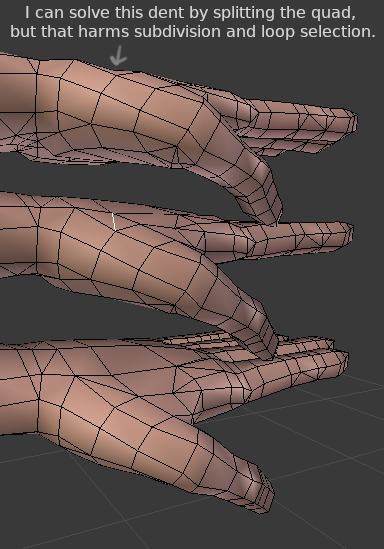
It would be nice to be able to keep a model as quads for modelling, but also have control over the hidden edge flow of triangles within the quad, which affect the silhouette. In 3DS Max, they have a feature called Turn Edges, and I would love to see this feature implemented in Blender.
youtube.com/watch skip to 1:44
Or maybe we could get a feature that allowed some edges to be marked as hidden, so loop selection and subdivision algorithms ignore it. that way, it might be less data than having every N-Gon keep track of its hidden triangles, and it might fit nicely with other special edge functions: similar to "mark as seam" you could have "mark as hidden" in the edge menu.
5 Comments
This has always been the worst bit about Blender's modeling.
I can't think of a situation where I would want a face to be non-planar in the first place. Can you give any examples of where you might do this? I'm not trying to be a modeling snob, I'm just not able to think of how this would be useful.
@testure: Anything round, low poly, or organic, like hands, hips, twisted forearms, armpits, etc.. will have non-planar quads, and depending on the direction of the hidden edge, it can have a huge impact on silhouette and lighting quality. Triangulating the face manually can solve the issue, but it affects edge loop selection and subdivision topology.
I 100% agree, i found this a problem when working with cloth simulations, it got "lumpy" when the angles didn't agree with the sim
Yes! I would love this too! I have to cut the quad everythime i need to have triangle control :(