
Align (or clarify) scale parameters for textures
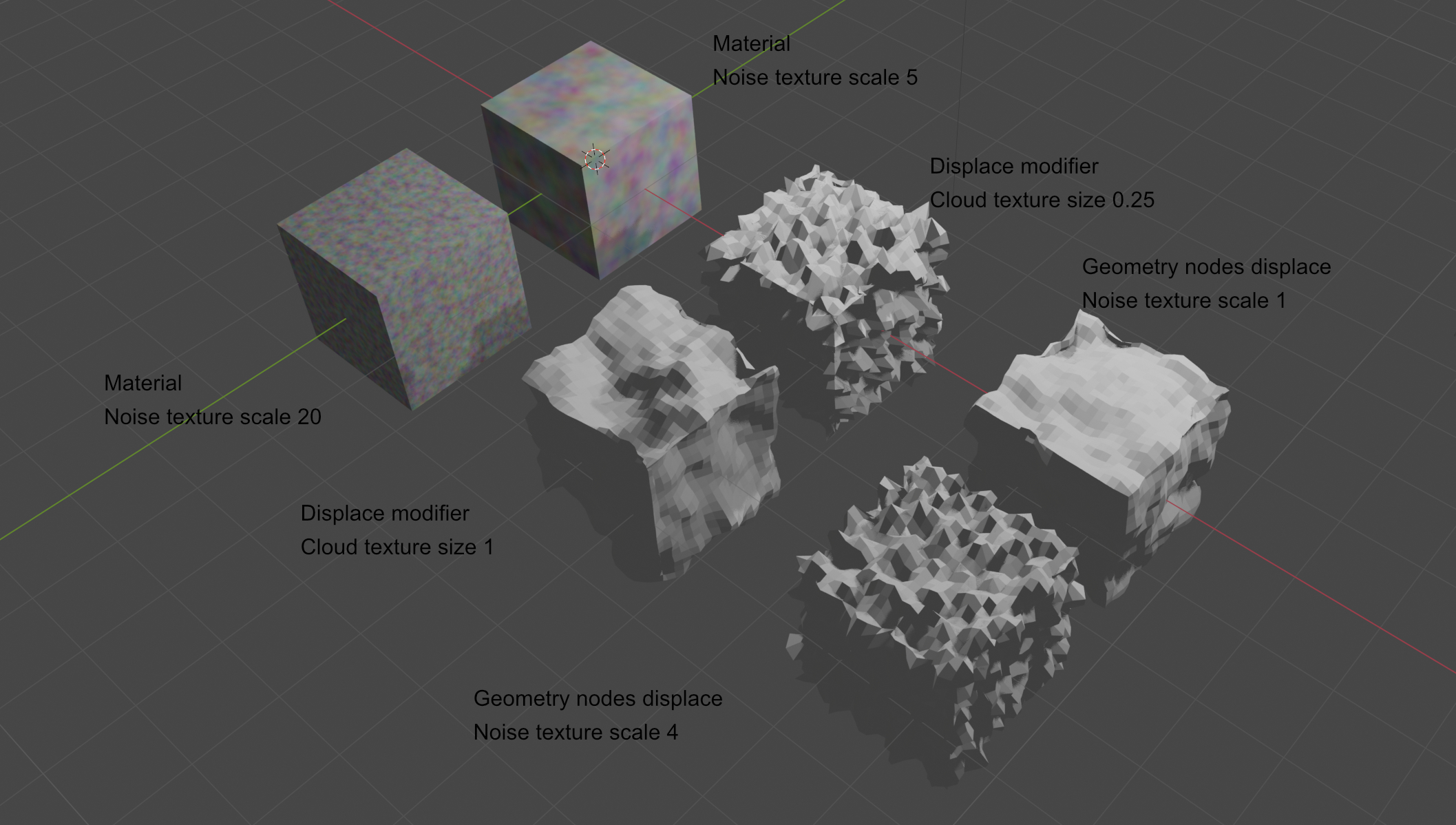 There are many kinds of textures in blender and many uses of them. All of them has some kind of scale. But the naming and meaning isn't consistent. Sometimes, the scale setting means frequency. Sometimes it means the inverse (wavelength).
I show here three examples. The row towards the bottom left has a higher scale (or size).
In materials, the scale parameter for noise textures means frequency. Increasing it means smaller features. I would say this is counter intuitive.
In the displace modifier, the parameter is called size. Increasing the size means larger features. This I think is good.
In geometry nodes, it works as in the material. The parameter is called scale. Increasing the scale means smaller features.
It would be good if this behaviour was consistent. In my opinion, increasing the scale should mean larger features.
Scale is an ambigous term. To scale something up means make it larger. But on the other hand, a map with a large scale (for instance 1:50000) means smaller features. I guess this is the intended meaning.
At the very least, let the user know of the parameter is a wavelength or frequency through some kind of hint.
1 Comment
The Geometry node displace is a simple set position with normal scaled by noise texture as offset.