
Show Images in outliner
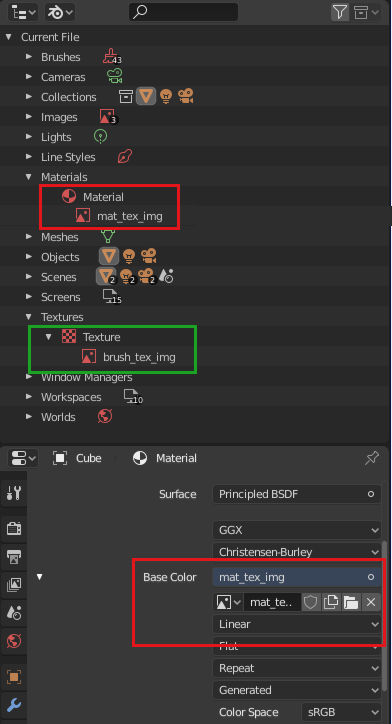
It would be useful to have images listed in the outliner. By that I mean expanding a node based material will list image and environment nodes with the corresponding image file. The IES and script nodes could also show internal/external text blocks.
This will allow the outliner to be used to find what materials and objects use an image.
In the attached sample, we can currently see a brush image texture (green), and would like a similar item showing the material image (red).
For background, in older versions of blender, when using the internal render, you could expand a texture and see the image name that it uses, which is still possible with brush textures. This meant that you could search the outliner and find textures and objects that used an image. Using node based materials this is not possible.
Maybe this can also be expanded to compositing nodes. For example, in the scene listing, we see view layers, if compositing nodes was also listed, we could find image nodes that bring an image into the compositor. This may be fit better in the blend file display mode.
3 Comments
a mockup would be useful- are you talking about images, as in ACTUAL images (thumbnails) in the outliner? or a text-list of the image files themselves?
* @testure * Just a text line, to show where the image is used and so that we can find them by name with the outliner filter.
* @Shane Ambler * got it, makes sense to me! have an upvote