
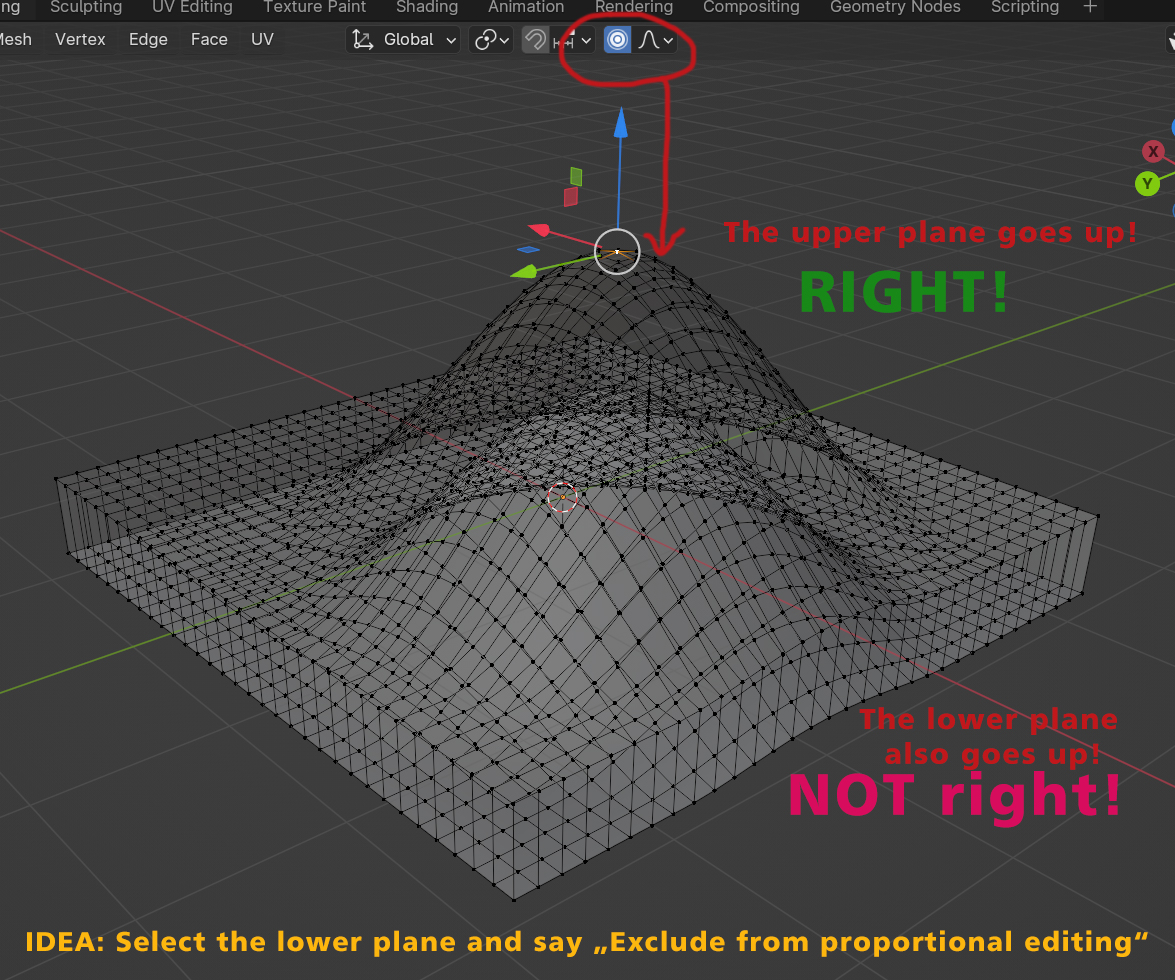
It should be possible to exclude points/edges/faces from proportional editing!
When you use the "proportional editing", then ALL points are effected, just how big your radius is. There should be a function to exclude points etc... from proportional editing.
6 Comments
Select the lower plane and hide it...
Yep. Hidden mesh parts won't get moved by proportional editing.
I personally don't either like to hide mesh parts as means to simulate masking / selection of tool target area.
"Soft selections" are rather inconsistent in Blender - newer sculpt tools pretty much offer this feature / yet it is not available for "normal" mesh editing modes.
In sculpt mode you can isolate a "soft" selection by face sets (essentially a mask or selection) like this:
So in other words, get the sculp mode's marsk into edit mode?
Using the "connected only" option will prevent the lower plane from being affected as well
It is a good idea that I would support, however you didn't provide any plan how you would execute it. See my other comment. For example, sculpt mode already has this functionality, it could be somewhat copied into edit mode too.