
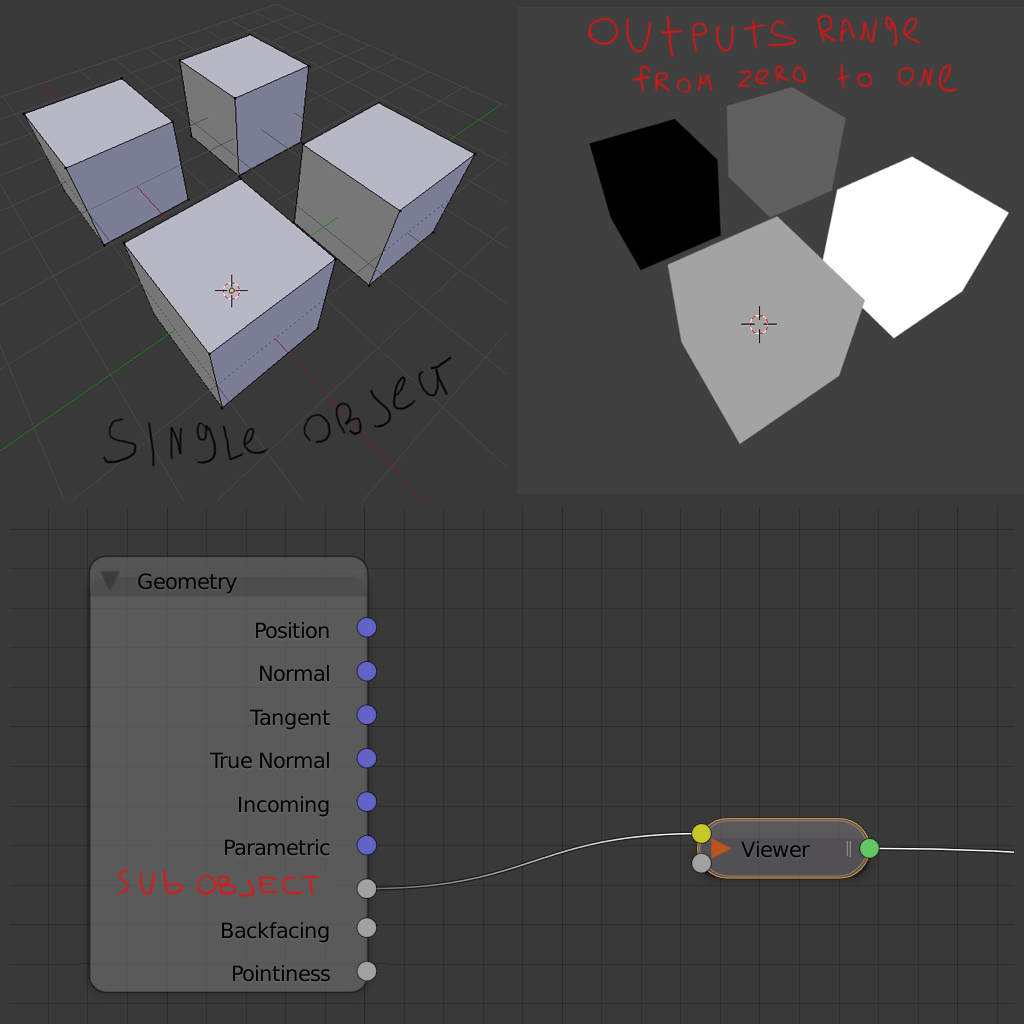
Subobject detection input
Another feature I miss in node inptuts, is an subobject ID. If you have an object composed from a couple unconnected meshes. And goal is to give them a unique color for example or any other distinctive feature. I dream of a fast and efficient way to do it without using vertex colors or dedicated UV layout
14 Comments
this could work more like the random on the object info. but i dont think blender stores any info/id automatically or in an array for each of the sub objects. What would help would be a random ID generator for each of the object meshes, then we could use that as a material id
Technically, this is already possible on the compositor side using material IDs.
In any case, from the material side, how would you define IDs for those sub-objects and filter them?
* @Jason van Gumster * I want to be able to use ID's within single material
* @lordvigore * That's fine. How would those IDs be defined?
* @Jason van Gumster * I'm not sure what do you mean by "defined", and I'm no programmer either to give a proper technical answer. I can only imagine that command "select linked" has something to do with it
* @lordvigore * I'm not asking a programmer question. As a user , how would I tell Blender that one set of linked vertices has a sub-object ID of 1 and another set of linked vertices has a sub-object ID of 2?
Technically, this is already possible using vertex groups, but it sounds like you want something automated. Part of that could probably be done with an add-on that generates vertex groups based on mesh islands. But it's not done with an add-on, how would propose that, as a user, I know which sub-object ID belongs to which set of linked vertices?
* @Jason van Gumster * automatic distribution is sufficient i think. By the way I never succeeded to utilize vertex groups as an argument for material building, is it possible?
* @Jason van Gumster * once I was doing an autumn tree, and i had to make a dedicated UV map just to be able give each leaf unique color from ramp node. I wish I could accomplish same task without additional uv's
* @lordvigore * You know what? I misspoke. I was writing about vertex groups when I was meaning material assignments. That is, for each material slot, you can define which faces belong to that material. That isn't vertex groups, though it's similar. It's more like face groups.
In that case, materials are defined on their own, so you can't separate them at the node network. However, the workaround for that would be to take all of the common elements from your materials and bundle them into a group. That group gets shared between materials.
* @Jason van Gumster * I doubt you want to bother assigning new material to each leaf on the tree to make them look unique a bit :)
* @lordvigore * True, but I'd also probably take a different approach altogether for getting the leaves on there in the first place. :)
* @Jason van Gumster * I don't know if it is possible, but basically it looks like * @lordvigore * want's some kind of way to access linked geometry from the material nodes.
Looking at the Object Info Node , we can see we can already have kind of such behavior using it's random output:
AFAIK, this works on different objects and on particles.
So a workarround for * @lordvigore * would be either to use particles for creating the leaves, or separate each leave in distinct objects (note that if they are the same geometry, you can use instances so that you don't bloat out the memory).
BUT ! If this there was a way to make such similar behavior work on individual mesh shells inside objets, that could increase the possibilites.
* @Jason van Gumster * Just to add a little bit to this discussion. I have ran into situations where I want this kind of functionality. A friend of mine made this image, and I wanted to replicate the image using Houdini. [Link] imgur.com/gallery/4FBShlw I made the mesh, but every hexagon was separate, so I combined them for ease of use. Then I textured it with a nice wood texture, but in the original image some hexagons have a more darker tone than others. I achieved that with the object info's random output and multiplying it on the diffuse. It worked, but I had to re-separate all the meshes. This made tweaking it super annoying, as I had to hop back and forth from separating it and combining it to get it how I liked it. So I absolutely understand this post.
Houdini tracks every primitive in the scene and gives them an ID making this kind of feature possible, perhaps blender should as well?
* @daniellapalme * {attachment Woodpng}