
Add an "All" menu to shift-a in shader editor
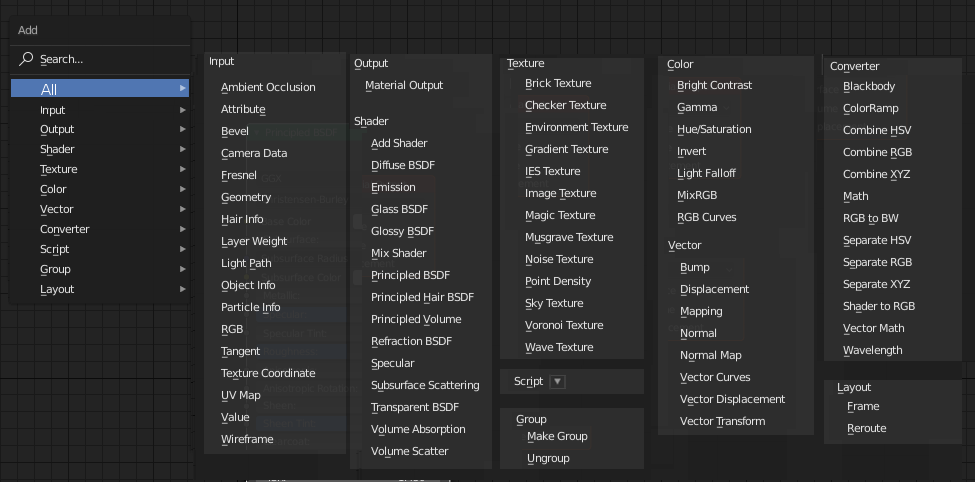
A lot of the time I am going through the sub menus one by one until I find what I am looking for. It would be great if there was an option to show all in the shift-a menu, like this (rough sketch). Maybe add it to the bottom though.
10 Comments
Having a "Favorites" sub-menu where you can put the nodes you use the most can be interesting too ! There are so many nodes I use so rarely. This sub-menu could also be contextual depending if you are in material or final compositing.
yep this is so much better than searching or going through menus!
IMHO the groupped display should be optionnal too.
Also, maybe not show the node groups (well, you didn't in your picture anyway). Depending on your projet, you could have up to thousands node groups in the group submenu, and it's really something used in a different manner. So I think this "All" display should reduce the "Group" par to the Make Group and Ungroup entries.
imo bad idea. Search is more useful. And for learning it is better to look at hierarchical menu
* @ Vyacheslav * Search is useless unless you know the exact name of the node you want. For learning it makes no difference because you can see the group where it is. It makes it quicker to find the thing you need because you can easily see everything quickly.
Both are good for different purposes. Search is awesome if you know the nodes, this "All menu" showing every node in it's category at the same time is also nice for anywone willing to see the big picture.
* @-L0Lock- * Here we have a problem: quantity of nodes is potentialy infinite.
* @ Vyacheslav * Just make the menu so it can scroll.
for now you can add all nodes into quick menu
* @Omgzdenek * Is it just along list with no grouping or can you organize them some way?