
grease pencil line tool and polyline tool
Hello, I saw that the Greate Pencil meeting has decided to remove the Line tool because it is the same as the polyline tool? I strongly oppose it and hope to convey my ideas to the developers of Greate Pencil here. Thank you! I hope that the line tool in the great pencil can be like clip studio paint, where you don't need to click enter to confirm and only need to click on the second point to end. This will distinguish it from the polyline tool, and the line tool is very, very, very useful for Boolean. And I don't want to use polyline tools for this kind of thing, because it's a very, very, very common operation. Because it's used too often, I hope one operation can be done without using two operations,This way, the simplified workflow is what I want, otherwise it will be very tiring.
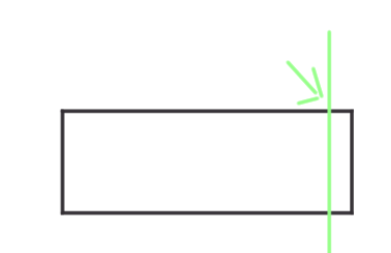
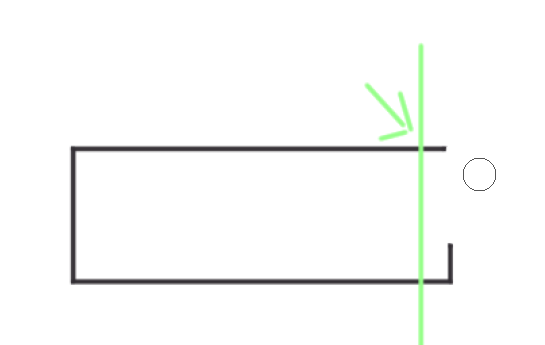
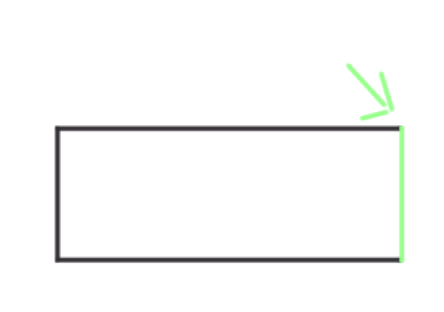
For example, if the green arrow is the position where I want the rectangle to end (if I draw it too big or too small, I have to constantly modify it,In fact,draw is a continuous process of modification), then I just need to draw a straight line (instead of using the polyline tool)at the position of the green arrow (only 2 points, and I only need 2 points), and then use an eraser to erase the excess line on the right side to achieve the effect I want. The line tool does not need to press enter to continue, nor does it need a third point. Thank you! Anyway! Thank you for your efforts, but the line tool really cannot be deleted,But as long as the line tool is differentiated from the polyline tool, it will be a very useful tool,
6 Comments
Yeah i agree. The Line tool allows you to move the points before clicking to commit to the line. But the poly tool strokes the line first, and you commit to end the whole sequence. if you mess up the placement with the Line tool you can just adjust the points to where you want it to be. But with the poly tool you will just have to redo the line. So i think they both have valid uses, and the line tool shouldn't be removed.
I don't seem to be able to board? If there are any registration issues, I can only rely on you. I hope my ideas can be conveyed to the developers at Grease pencil. Don't delete the line tool, my goodness. This is a very important thing,
The line tool would be better if you didn't have to commit a line with enter, and instead it simply laid it down without a confirmation. This is how the line tool works in Photoshop and it's extremely efficient for making technical drawings. I don't believe they should remove the line tool because with this one change it could be considerably quicker and more useful.
Commenting on the meeting thread may bring more light to this issue: devtalk.blender.org/t/2024-09-23-grease-pencil-module-meeting/36748/2
Current behavior on my Blender 4.2 is that the Line tool remains with the yellow end points until I press Enter, and the Polyline tool with the same click start and click end also need to be committed with Enter key to finish. I don't see the difference over here.
There is a difference: When you drag and release the line tool it creates two points, one at the start of the drag and one at the end. Then you hit enter to confirm.
When you drag and release the polyline tool, it won't create a point at the release and you need to click again to create a second point. Then you can enter to confirm. One extra step.
My use of the line tool is click to place the first point and then click to place the second point precisely where I need it, not dragging it and hoping I line up. Maybe think about asking to modify this behavior in Polyline tool to allow the same drag and release you are talking about when using it so that you get the same behavior - because the underlying code is the same for the tool I bet.