
Add Insert/Changed Keyframe Confirmation
Hello Everyone! Previously if we pressed "i" on our keybords we'd have a pop-up drop dialog requesting us to choose what sort of transformation we'd like to insert/change so It didn't need it. But now this function has been moved into the "k" key while the "i" key still works but instead of asking us it just does based on settings.
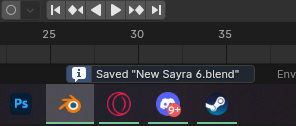
The deal is that right now (As of B4.1) we do not have any visual cue or any sort of indicator the "i" key did do anything, not even the little warning notification below in the will pop up to acknowledge something has changes. Specially if we're just changing a keyframe that's already there not even the little yellow nob in the timeline will do anything since It's already there, so this feels a little blind work.
So maybe printing a warning below in the UI like it does when we hit ctrl+S to save for example could do the trick. Does not need to be much really just letting us know something changed will be enough.
3 Comments
In 4.2 you will get an error popup if keying failed to create any keys. In which cases would a message for success be useful for you?
Actually the idea is not much as to if the keying failed is more about if it happened. Right now in 4.1 since we have no feedback from the software when we press "I" it just feels like nothing happened UX-wise
The reason why I am asking is that we got the feedback that the message was redundant and just noisy. In terms of UX usually animators have the timeline or N-panel open so they see the colors change. What is your workflow that benefits from the messages at the bottom?