
Keyboard shortcut for 2.8 scale cage
The new scale cage has many anchor points for a mouse, that needs to be accessed with keyboard shortcuts.
This is a suggestion trying to follow existing blender keybinding "logic".
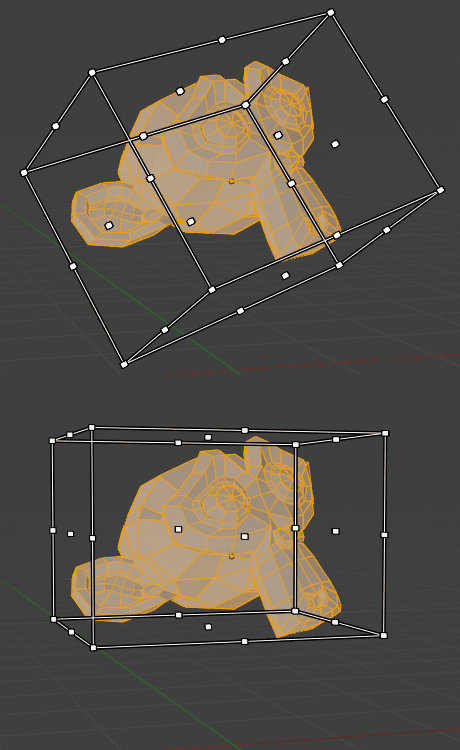
To enable scale cage, I suggest pressing the S key twice.
This is similar to pressing G key twice for edge/vertex slide, and R key twice to enable trackball rotation.
Pressing the S key twice allows you to manipulate anchor points with mouse.
Press Enter to complete action and return to previous active tool. (Or escape to cancel)
Pressing the X key while scale cage is enabled, the mouse position can scale it towards the x anchor point.
(Ctrl for snapping, and shift for fine adjustments)
Pressing the X key again will switch x axis anchor.

The x y z can be combined to navigate towards a anchor point.
If you want to get positive corner x and z, negative y, you press x, z and double y.
You can also get to the same corner by typing the sequence in any order, "yyzx, xyzy, yzxy...",
Gif of an example with "xyyz" sequence

If you have accidentally selected an axis to scale on (You pressed x, but only wanted to scale on y), you can reset it with the Alt-X Alt-Y or Alt-Z. (This is similar to Alt-G, Alt-R, Alt-S to reset transforms)
So normal old scale with one S key press.
New scale cage with double S key press.
Pressing the S key a third time it goes from global scale cage orientation, to local scale cage orientation.

Pressing the S key a 4th time, it loops back to normal old scale operation.
I am unsure if this is the best approach to change reference orientation, since triple pressing a key to reach a operation is not standard blender. I would like to access global/local change on scale cage in a fast manner.
(Is it another good key we can use to toggle orientation mode while in scale mode?)
3 Comments
Yep. Actually, just make the cage the default. It's infinitely more useful.
I agree hotkeys would be great for this, the presses maybe too much, how about toggling it with Ctrl? Noticing the scale cage in UVs and the Viewport, does anyone know if it will be coming to the dope sheet because that would be extremely helpful too.
@wondraknathan:
Ctrl is taken for toggling snapping, shift is for fine adjustments, alt key is used for resetting axes.
The normal scale/rotate/transform uses double press on x/y/z to change local/global orientation, but that wont work in current setup.
When i think about it, the tab key might be used as an option to toggle between local/global scale. Some operators, like Ctrl+f for flight uses tab to toggle gravity, without affecting mode change.
Alt-Spacebar can also be used, that might make more sense since it is already the hotkey for changing transform orientation. Only problem is that space is used to confirm an action, same as enter key.
I might be overthinking it, and we should not have a toggle for global/local. Just set the orientation with alt-space before starting the scale cage operation. This way we can get a scale cage for local, global, view or custom orientation.