
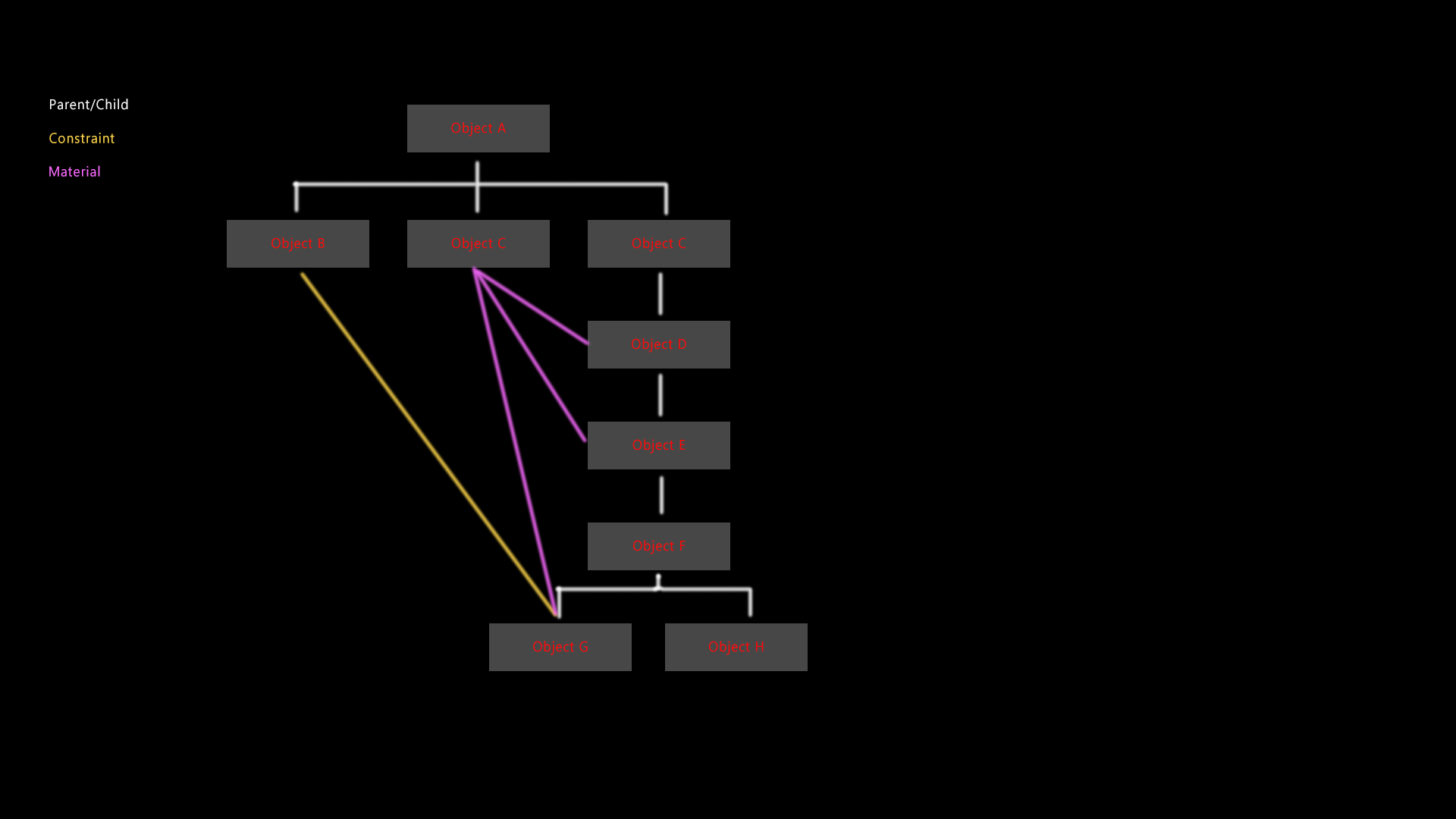
Schematic, hypergraph, or watever fancy name to a hierarchy viewer ;)
So Blender needs a view to look at how items in scene behave to each others.
It's specially usefull to view, fast and easy, how hierarchies are in a project, which objects have constraints affecting each other, wath objects shares materials, expressions, links, etc, etc, etc...
Using only the ouliner in many situations makes, nearly impossible, to discover how objects are connected, parented in a fast ans reliable way. A hierarchy viewer makes it instant.
Image example below.
14 Comments
Not realizing this thread already existed, I requested more or less the same thing, but with a slightly more "Blenderized" UI ( blender.community/c/rightclickselect/mYDO/ ). Why such a feature existed and was removed is beyond me; with the right implementation, this feature would be a major game changer and I think could be the single-most useful feature in a Blender 3.5 release). It is exactly what put Softimage in a class by itself with regard to scene orginization. If you awesome Blender devs are reading this, I am literally begging you to implement this.
scematic would be my top feature in Blender and if it was similar to what I had in Softimage/xsi, I would switch immediately. You know immediately how what is linked or hierarchical, where I find the lamps whether what is animated or hidden or whether only polygons are hidden, which object has constrains/expression/shape animation etc.. A dream! What is in blender eevee, is in Softimage the Scematicview. So have mercy with former Softimage users, the program was just top
can unfortunately only vote once,
{attachment filterjpg}
{attachment scematic_iconsJPG}
{attachment workJPG}
Sections hierarchies can also be grouped or presented in a simplified way
{attachment collapse_AJPG}
{attachment collapse_bJPG}
I'm actually rigging a character and it's nearly impossible to know how exactly a hierarchy is organized without this feature... this really needs some development love.
Screenshots taken from Softimage to ilustrate better the idea: A Skeleton rig with the schematic hierarchical representation: {attachment Captura_de_pantalla_2020-12-16_111445png}
Bone selected and zoom to the schematic view to see how a Constraint connection it's showed in place: {attachment Captura_de_pantalla_2020-12-16_111601png}
Everything active but numerous ways to show only the desired info: {attachment Selected_Bone_Shows_Constraintspng}
So you want back the Oops viewer from 2.4x era?
* @ Lsscpp * I actually just heard about this recently when Ton tweeted something about it. What was Oops? It sounds like it might have actually been pretty usefull
* @Zach Hixson * twitter.com/BlenderToday/status/1337069818130927617
* @aphex1982 * That's the idea, yes!
* @aphex1982 * Oh, that's really cool. I wish that stuck around and got refined over the years, would have been really helpful. I'm now stuck manually making flowcharts on how the projects are linked together before I upload them to the companies archive.
One more example using a character holding a sword {attachment Schematic_View_Bpng}
Back to 2.4x, it was looking like that and that was awful..! {attachment blender240outlinerPNG}
Actually, this design can be useful but most of the time it become a complete mess
* @Shimoon * What if all nodes were translucent, but when you selected a scene or an object in the graph only the things that the node was directly connected to became fully opaque? It would allow you to see exactly what references that datablock in both directions, but not be too cluttered to actually see any useful information
* @Shimoon * Well, there are methods to not get too messy with schematical representations, basically toggles to switch on and off different kind of connections. ie: You just want to get parenting connections, you switch off everything else. You need also Constraints, you switch on those. Lines must be a different colour. You need materials shared, you switch on those and lines with another colour are shown. Etc...
The nice thing about this is that with just a simple eyesight you can see how hierarchies are distributed in the project.
Back in Softimage, for example, you could compact all hierarchy below a node with just a double click. And expand again in the same manner. In that way you could, for example, compact a full hand if you didn't need to see every single finger bones.
As everything in a 3D project has a relationship of some kind it is, by far, the best way to represent it in a graphical and simple way.
* @Zach Hixson * Nice idea!