
Active Keyframe and Proportional Editing in Dope Sheet
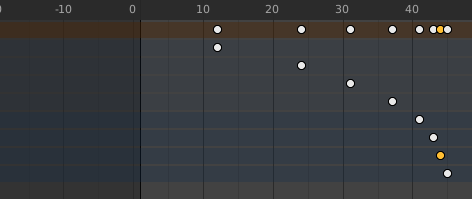
I tried getting my keyframes to have a gradual offset and this is really hard to do. Maybe it's possible to have an Active Keyframe - much like and Active Vertex or Edge. This way we can aim our proportional editing to affect not the same keyframes within the same object, but rather the keyframes that we choose to move.
I think this will increase the motion graphics/animation capabilities of the Dope Sheet as it will allow the user to create smooth and gradual "Ramp Up/Down" or "Easing" effects across multiple numbers of keyframes.
4 Comments
How would you go about this, on a usage level? Select the keyframes, then the interpolation type and then just hit a button to distribute them?
* @Amaral Krichman * I would imagine using it like this
I would select the keyframes I want to manipulate and then have my last selection be the "active" keyframe to which the Proportional Editing will source its influence from
Then when I hit G or S, that circle which indicates the influence will appear and i can use my mouse's scroll wheel to adjust the size of the influence.
I know that by how proportional editing is now, having the other keyframes selected might mean that they'll have the exact transformation i give to the "active" keyframe regardless of how i manipulate the size of the influence.
but maybe this can be a special feature in the dope sheet. if I only have one keyframe selected and I choose Proportional Editing, it'll affect all of the visible keyframes surrounding it. but if i have several selected, proportional editing will only affect those selected in relation to how the active keyframe moves. just a way for me to isolate the keyframes that I only want to edit.
* @bodick * Sorry I took this long to reply, I completely forgot about this site, lol. What you propose is actually a really cool idea! I had imagined something else. I think it would take some tinkering, but it shouldn't be -that- hard to implement. My developer hands only go in python-deep for the time being (I assume it'd be far easier to reuse the interpolation internal code than to craft it from scratch in python) but I'll definitely stash it in the 'someday' drawer. If I ever get around to it, I'll hit you up!
Just find out this option didn't exist yet in Blender ! I discovered a great After Effect extension that does exactly that (and much more). goodboyninja.gumroad.com/l/Skew and youtube.com/watch Would be great to have at least what you describe, that is having a falloff that works between different elements !