
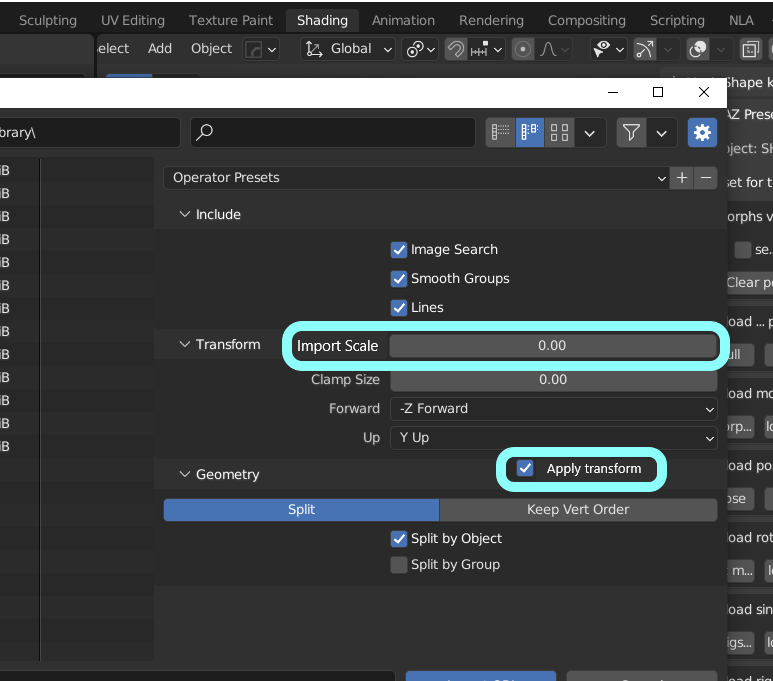
option to set import scale, and Auto apply transform for obj importer
I sometimes need to export/import as obj format. Then blender update obj importer/exporter recently. thanks. But I really do not know why we have scale option for exporter, but there is no scale option about OBJ import settings.
I know there is " clamp size" property, but when we need to import/export OBJ to another applications, we may hope to set "scale" as reverse. (eg export scale as * 10.0 to another, then import scale as * 0.1 to return)
Though I know, I can change scale after import obj, then usually we may apply rotation, scale (or transform) along with import axis setting (-Z forward , Y up etc)
But we usually keep setting when export import for each purpose , then blender offer + button to save those.setting.
Then add Scale option and apply transform option for obj Importer setting, it should be useful.
summarize
1 . add scale option (input scale value as float = as same as obj exporter setting)
- add option which can auto apply transform (toggle check box) after import
1 Comment
Import scale was just added for Blender 3.4 ( developer.blender.org/rB42b1a7d4c66 ).