
Trimming and Extent Polygonal Tools
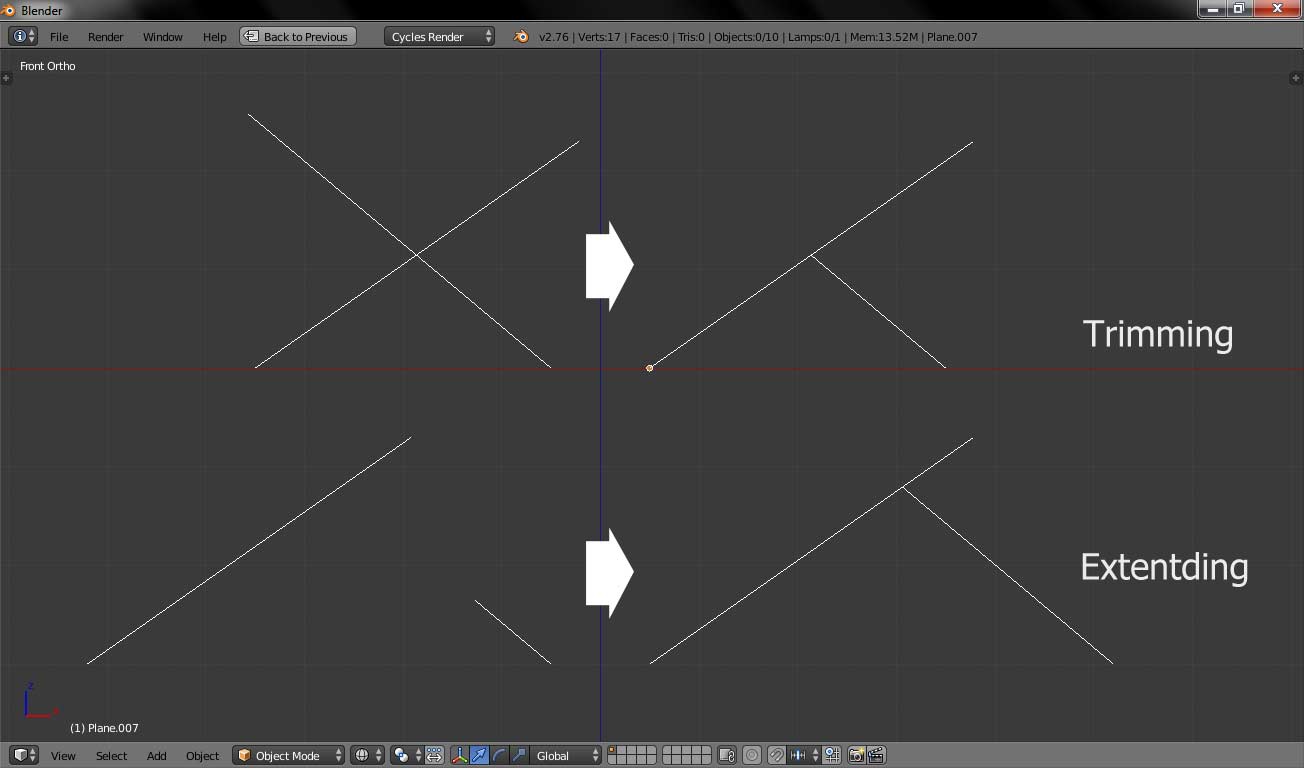
I think Blender need simpler tool to do polygonal trimming and extentding. Currently I must do several step by creating dummy objects, boolean diffrentiate them, create new plane mesh, delete all vertices but two of them, add another vertex on the edge and finally snapping vertices to the vertices on the boolean result. How very long and difficult steps to do!!
For modelling techincal and architectural objects these tool will cut a big amount of time in the workflow.
7 Comments
extanding already exist : take a vertex, make GG to grab a slide along the edge, and C to disable clamping
i try that but can't get the result as in the screenshoot
wiki.blender.org/index.php/Extensions:2.6/Py/Scripts/Modeling/mesh_tinyCAD
for trimming, you can have it with the 2D boolean addon. I agree it deserve to be in default in blender
yup, i think better if it included as built in Blender modifier
It's nice to the the results of what you want to achieve. However, what does the workflow look like? How would the user decide which edges are trimmed and which are extended? Would you simply trim/extend all selected edges relative to the active edge? What kind of feedback (if any) should Blender give in the event that the two chosen edges are skew and there's never a chance of intersecting?