
Better topology for converted text objects
Currently Blender creates almost too bad topology when you convert text objects to mesh. Often I find out, that I have to model the whole text again, because I cannot use the object I just created.
When converting text objects to mesh, it would in the future start a setting popup:
- Triangles / quads / ngons
- poly count slider
- doubles / no doubles
Examples of the topologies: Triangles: dl.dropboxusercontent.com/u/5904620/Blender_aid/triangles.jpg Quads: dl.dropboxusercontent.com/u/5904620/Blender_aid/quads.jpg ngons: dl.dropboxusercontent.com/u/5904620/Blender_aid/ngons.jpg
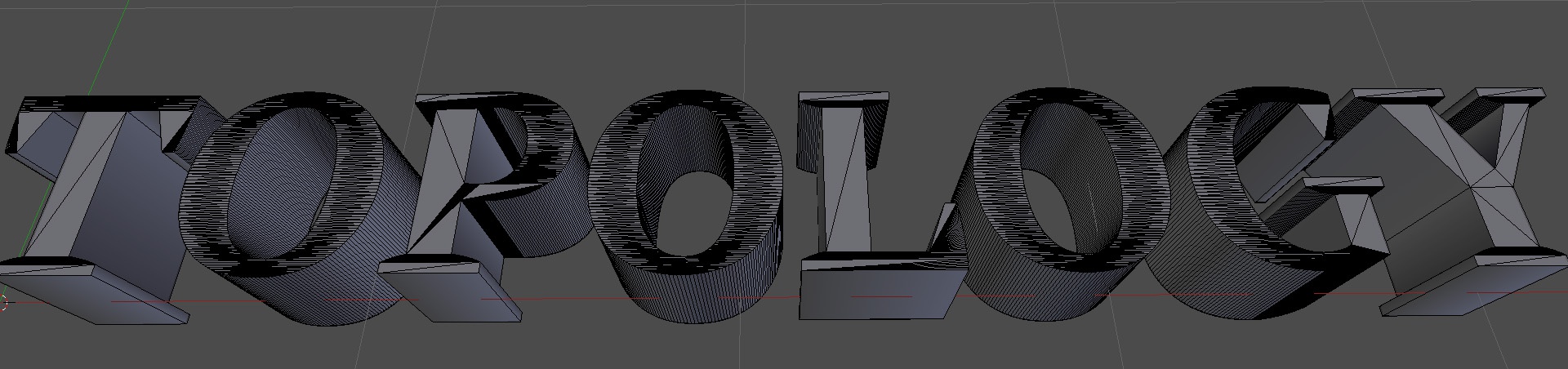
6 Comments
i think some logic that can detect pencil strokes as how we write, and hos some letters are made nicer (most fonts are simple variations), some fonts like windings, wouldnt be able to follow such logic, but once you find the strokes, next some quad solution, might be nice to fill the strokes while keeping the font bounderies.
Need this!
While I would love better topology for text objects, it's not quite that simple since it has to be able to handle every character of every font possible. However, there may be a better solution out there somewhere
It might be helpful if, as part of your proposal, you include an example or two (or three) of the topology you want Blender to produce from text objects.
Thanks for the idea. I've now uploaded the images here
Blender already has the capability to do this using Geometry Nodes- so why not have that as the default? It should be simple enough to have this setup as a preset with some input fields. See the video below- this method produces very clean text geometry. youtu.be/5SRiESHQkmY