
Faster and easier moving UI
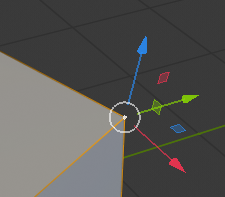
I think it will be a improvement to move and select at once on Mouse Down.
- Mouse over "ex. vertex"
- Click and hold Mouse button Down to move/drag "ex. vertex" (no visible moving Gizmo)
- After moving, release Mouse Button and the moving Gizmo will show up as usual
This will make it a lot faster, and you wouldn't accidentally Select the axis of the moving Gizmo.
And it would not change the workflow at all if the cursor isn't over "ex. vertex"
One click instead of two = 50% faster at least ;-)
3 Comments
This is a feature already. It still would need a highlight to optimize this, but technically this feature works.. it's just hard to know what you will move till you click it (as there is no highlight). I hope they add highlights.
How does this differ from the already existing tweak mode?
@Jason van Gumster: Maybe It's the same.. I am a super new to Blender and didn't know about that tweak mode. i Google it but can't find out where to Changes to tweak mode in 2.8 if it is like I describe, I think it should be the default setting for ease of use