
[Updated] Customizable outliner filters
Hi guys, when using multiple outliners with different filter settings (for instance, one outliner showing only cameras and another one showing only empties), it becomes easy to get confused as there is no way to differentiate them visually. It would be great to have the possibility to add a title and a color to each outliners we use. The color could also be reflected in the filter icon.
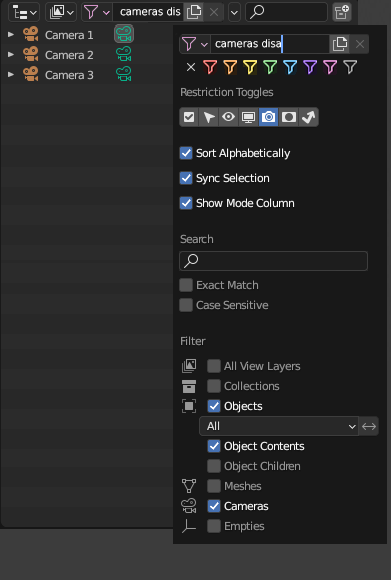
EDIT: I took some time to elaborate it further. Please refer to the images below.
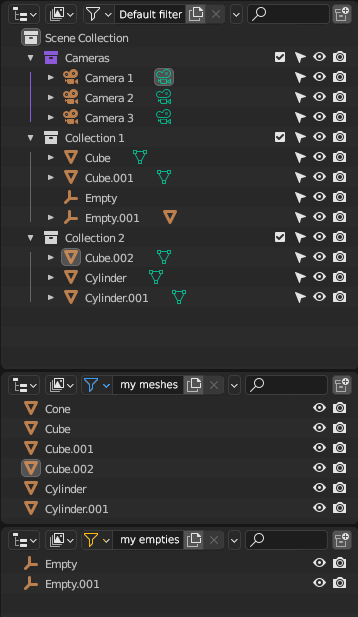
GENERAL VIEW: when opening multiple outliners, the default filter would be the one from your startup file. Quite similarly to now, you would have the possibility to open other outliners and set different filter settings to each one of them.
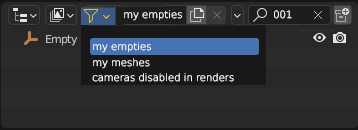
FILTER SELECTION: Clicking on the filter icon would open up a drop down menu similar to Scenes, Layers, etc
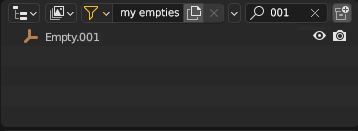
SEARCH WITHIN FILTER: The search bar would still be accessible besides the filter, however that search would be contained within the constraints of the active filter
CREATE NEW FILTER: To create a new filter or edit an active filter, you would click on the small arrow.
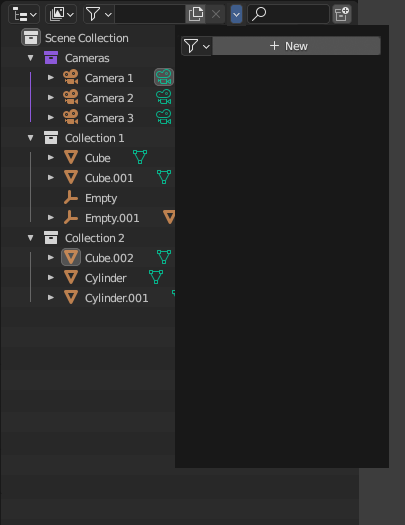
SET NEW FILTER: After clicking on "new", a drop down menu similar to the current search filters would open up. Note that you would still have a search function, specific to that very search filter. You would be able to color code your search, similar to collections.
1 Comment
Interesting