
¨N¨ panel filter
Create a filter or search bar on top of side panel to filter addons and options. Is nice to have the last update made it but still scroll all the way down searching for something is kinda buggy.
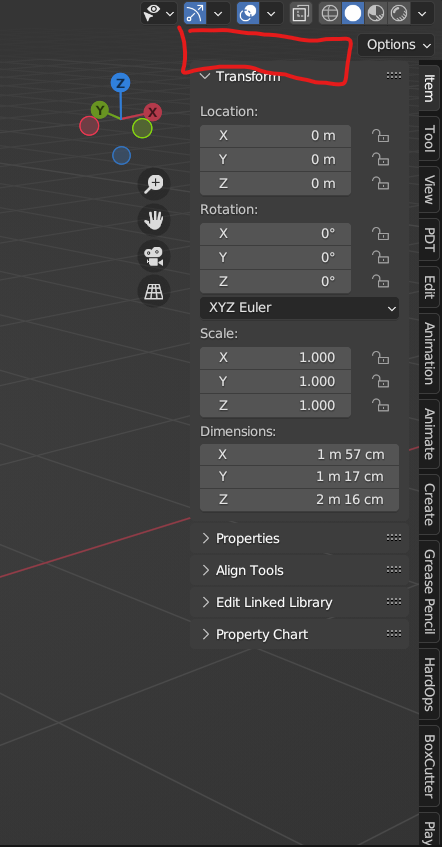
Create a filter or search bar on top of side panel to filter addons and options. Is nice to have the last update made it but still scroll all the way down searching for something is kinda buggy.
6 Comments
Unless we're going to get a totally new N panel UI for Blender 4, I think the search option makes a lot of sense
Why "unless" ? Any part of the UI containing lots of things could make use of a searchbar.
Unless because if they redesign where addon panels show up then it might not have a lot in the N panel. That N panel is not a good UX for addons and it's been called for redesign so many times since 2.8
I think its the addon developers' decision to put the addons in the N-panel, right? You can basically add your menu anywhere.
Item / Tool / View / +
click the plus and you see all your installed addons that have an entry in the N-Panel and you can select them to show up on a per project basis.
Needs some confirmation when installing though, just so the user has feedback it worked. Maybe when installing it appears in the N-Panel and can stay there as long as that project is open, chances are you install an addon and want to use it instantly.
And that would need an option to disable the tab again, I'd put that on on a rightclick on the tab, no x-button to close it that eats up precious screen space. And rightclick is where there should be an "always on" option as well. Or always active. And for powerusers of that feature it can get crowded and then a searchbar would indeed come in handy, upvoted :)
Same as in the properties Editor, yes!