
Move to Same Collection of Last Selected
Hi! Thought of this time saving feature.
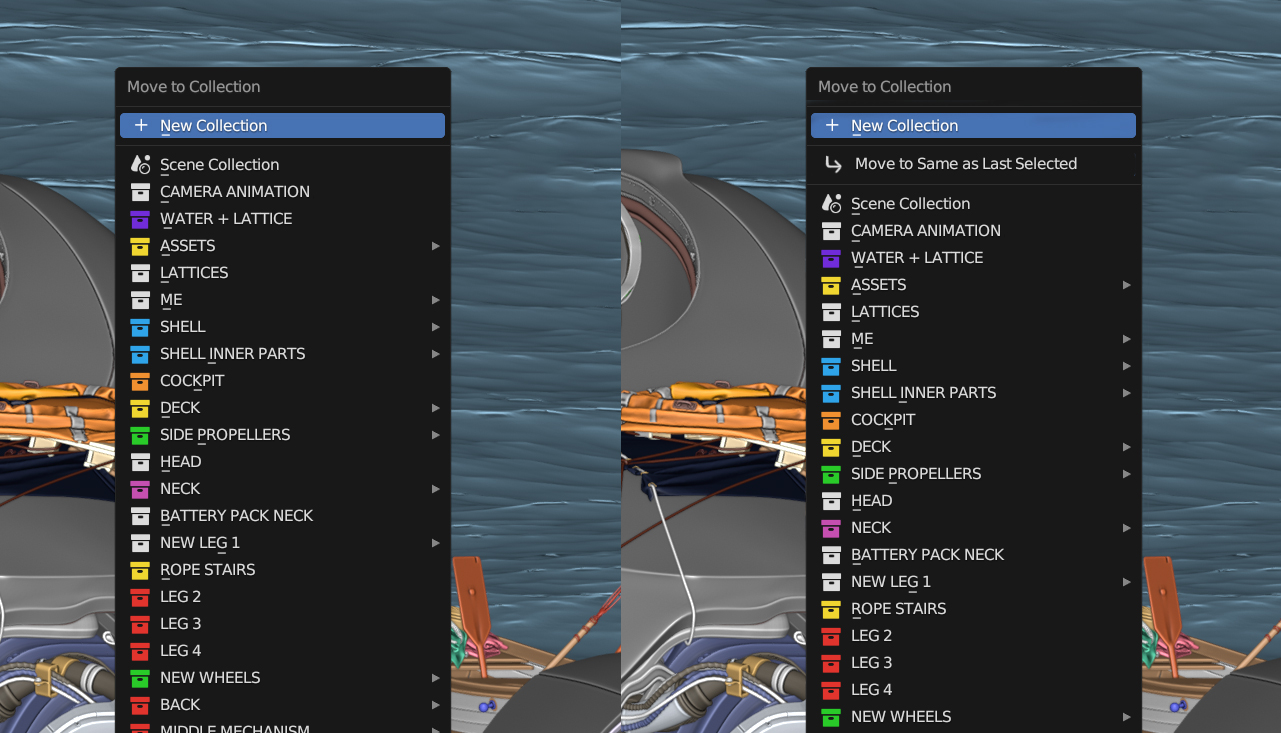
It would be helpful to add an option called "Move to Same as Last Selected" when moving objects between collections.
This option would appear in the pop-up menu, allowing users to quickly moving objects to the same collection as the previously selected object - Instead of having to remember or lookup the collection that the target object has.
6 Comments
Have you tried Ctrl L :
Link Collections?Wait... This works the same?? Just tested, didn't know about this. Thanks for letting me know! I still believe it would be a good idea to have this on the Move to Collection options though.
Well technically you are "linking" the collections, though I guess the end result looks the same as moving.
And since the Link Data menu already contains lots of similar actions, it makes sense to group them here too.
Wouldn't the move to collection have to be called link to collection then? Is there anything else happening besides the object moving to the collection when using Ctrl + L? I only understood it does the same when I tested it.
It kinda feels like the object would be forever attached to the same collection as the one you linked.
Let's say I "Link Collection" of object X to object Y that is inside Collection 1. If I move object Y to Collection 2 shouldn't object X move together since it's technically linked?
In my opinion the linking should work like this - and moving should just move. Maybe it's even a matter of fixing both behaviors and making them separate things...
Usually in Blender UI the concept of "Last selected" is rather called the "Active Object" (yellow outline) in contrast to selected but not active with an orange outline. Because Blender AFAIK doesn't have a concept of order of selection apart from the active object, which is not always the last selected. For instance if you grab-select objects without clicking on them, you won't make any of them active. So I think the entry would rather be called "Same as Active Object".
Makes sense!