
Extend the capabilities of the timeline marker
The ability to change the marker duration and add comments to the marker, as implemented in premiere pro
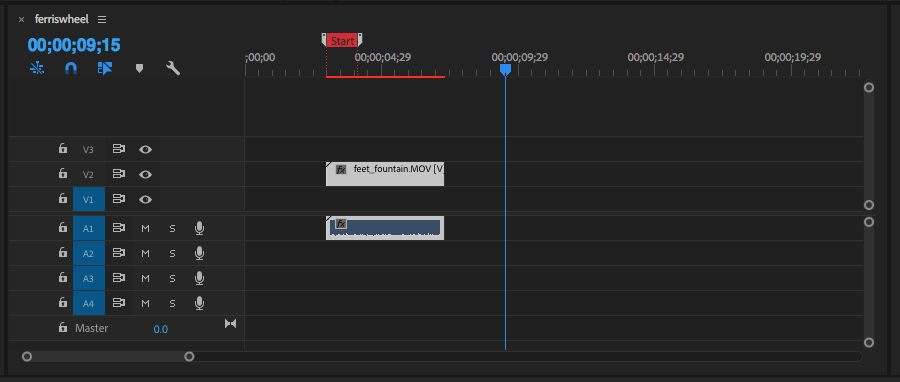
The ability to change the marker duration and add comments to the marker, as implemented in premiere pro
4 Comments
Many software have bookrmars with a bit more features than just a single position and a name, which we could have a look at to identfy nice things to add to Blender's
. Davinci Resolve can associate colors and tags, which themselves can be used as filter for other usage like frame jumps or writing chapters in exported video files metadata.
The way you make marker is just clicking a button, it creates a one-frame marker with the default color and no name, and you can double-click a marker to open the editor and add extra flavourings:
Animbot's time bookmarks is another example of bookmarks. Click the button to make a one-frame marker, or select frames to make a marker on the selected frame range (Maya can select frames in the timeline).
Though Maya finally got its own bookmarks recently, and it's pretty good too.
You click the bookmark button to open the bookmark creator, which you can type a name, frange range and color. It will automatically use the frame range if you select a bunch of frames . Markers can also be used to change the time slider frame range, it's really handy if you need to spend time animating a specific range of your animation or make several renders with different frame ranges: just frame the timeline on the corresponding markers.
Both animbot and Maya have a bookmarks manager that allows to manage marker in bulk rather than opening an individual marker's settings.
Overall, we can note a few features that could be interesting in Blender which i like to rtegroup in three categories of usage
Personal Organization
Management
Table-like design, with tab/ shift tab to navigate columns and enter / shift enter to navigate rows are very efficient for that.
External Use
Is start the marker in this image? How would that interact with binding cameras to markers, what are you using markers for in Blender now? etc.
I reckon it wouldn't make sense to have "no camera" when a marker ends without a new one taking the camera right away, so I guess the behavior concerning cameras would remain the same: keep the camera untill a marker asks for a new one.
Can you mock up what you would want the Blender one to look like