
New Looped Selections Parameter for Checker Deselect
The checker deselect is a powerful tool for selecting patterns in Blender, but it is also having a problem that could be fixed, I think quite easily.
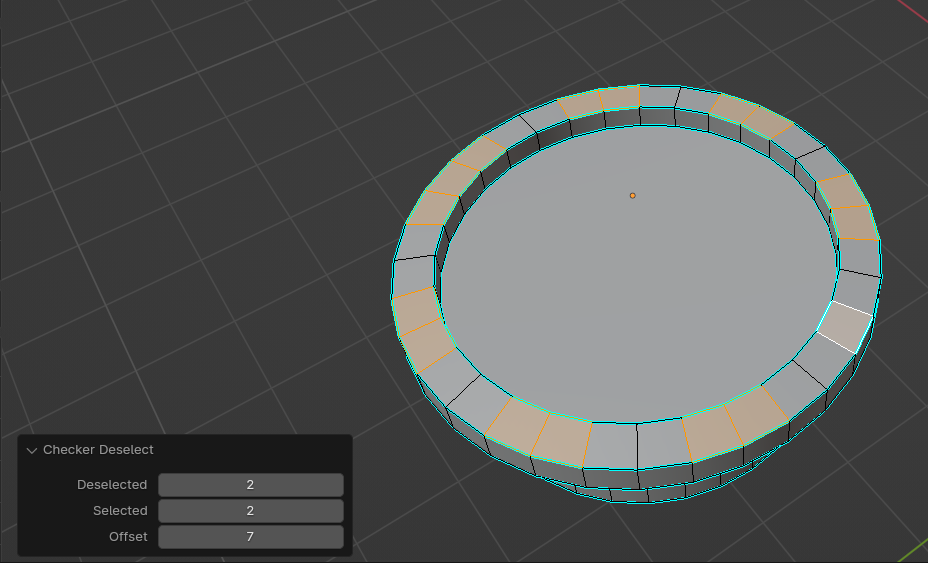
It works nicely when you are having a row of faces, but if the selection is a loop, then the pattern doesn't anymore look what expected, no matter what parameters you use in the tool.
The reason for this failed action, I believe, is that the tool starts selecting the same pattern to both directions from the active face and the selections then meet in the opposite side of the loop, which in my image caused this selection of 3 faces and the active selection face stayed alone. Basically the tool is useless in this case.
So my suggestion is that you would have a checkbox in the parameters of this tool, which would say "loop selection" or maybe "one direction only". That would make the selection calculate only one direction from the active face until it will reach the active face again or end of the geometry.
Currently only way to use this tool in looped selections and have desired results is to cut the geometry before the active face, which will force the tool to start selecting to one direction only from it.
0 Comments