
Hide/Resize Head and Tail Handles in Armature Bones
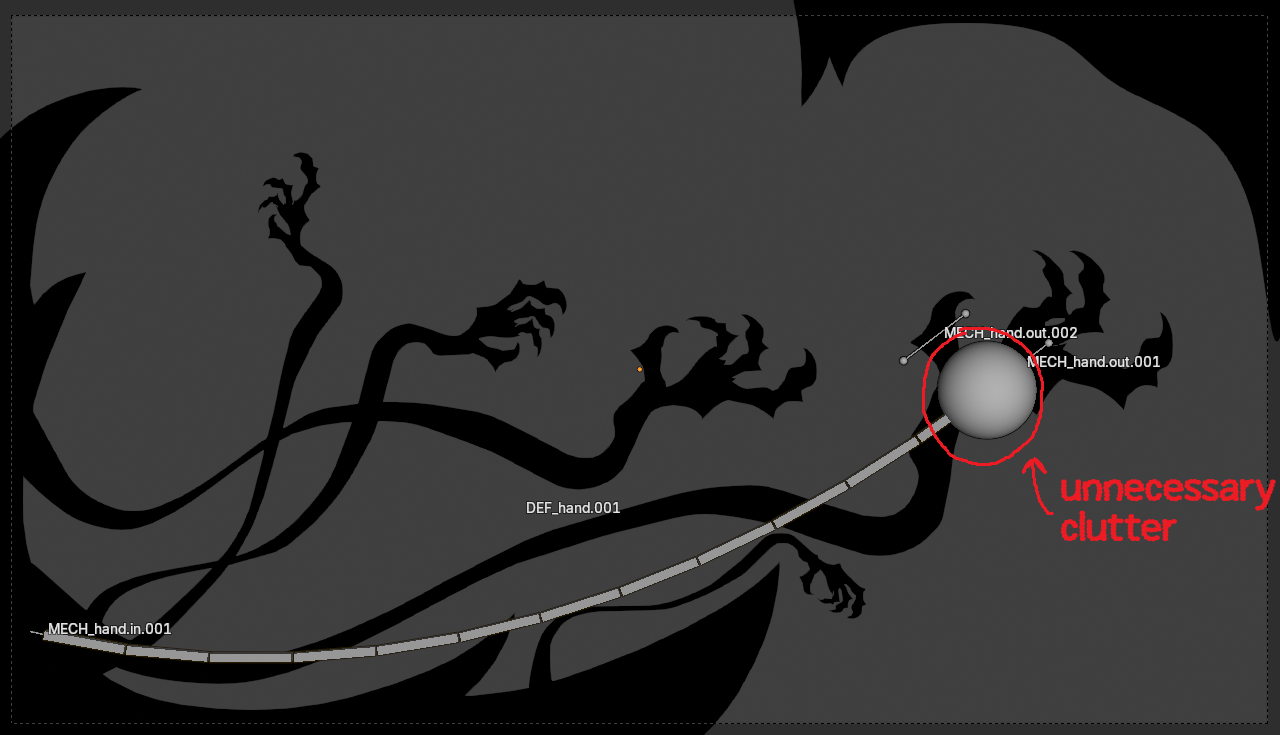
I often work with Bendy Bones with my Grease Pencil. Although it does not hurt my ability to finish my rigging, it is often very inconvenient that I cannot hide or resize the balls at the beginning and end of the bone. Viewport display sizing of bones only affects the thickness of the bones, but not these tail/head handles. As you can see in my screenshot, the tail handle for the bone is so large that I need to hide the entire bone or change from Bendy Bone view just to be able to see the rig properly.
Some possible changes that can be considered:
- Automatically resize not only bone thickness but also the size of these handles with the existing bone sizing viewport options
- allow hiding of the parts of bones individually instead of the entire bone at once
- allow resizing of head/tail balls separately from the bone itself.
I think option 3 is the option I would prefer the most as it gives me the most flexibility depending on what I am doing, but perhaps a different option is easier to accomplish.
1 Comment
Hello. I've checked with Anthropic Claude, the online, free version.
It does look like the features corresponding to the drawing of the Size of both Head & Tail Bone Ball Joints would be "hard-coded" in the C++ "overlay engine"; or something like that. That means this can't just be achieved by Python Script (the UI Options, yes though; I thought as 2 Slider Buttons (Size: Head, Tail) in the Properties Editor → (Armature) Data Tab → Viewport Display Panel, at the very bottom; so, then, generic settings (not Per Bone), and which affect specifically these 3 Display Types: Octhaedral, B-Bone, Wire; since those are the 3 Bone Display Types which seem to equally draw in the same pattern, those Sizes that are more cumbersome by default when the Bone Length is too big, on Edit Mode.
Besides, that also means, that the solution needs the "Patching" method, a change (a 'patch'), even if very tiny, to the source code; a bit like a different, experimental, custom Blender, that needs to be compiled. I never did that [Patching] on my own, but I know some artists that are doing exactly that (even if it might never get implemented in Blender core; it's because it seems barely no one wants to be Reviewing crude AI-Assisted Code in Blender Development staff... maybe for good reasons)! I'm already familiar with making handy Python Scripts and Addons from AI-assisted coding though.
I'm telling precisely these, because if this Feature Request could just be achieved through Python Script, I'd have attempted making it already, since this is now very accessible with AI-assisted development (at least I have been 'lucky' with Claude). I'm thus encouraging the making of concrete proof of concept of any Feature Request that I find valuable in Right-Click Select. I just can't unsee what I've seen already.