
Geometry Nodes: Identify and control specific Instances in Collection hierarchies
In large scenes a common use case is to take an instanced collection (usually linked from a library) and want to modify it. For example, you might have a city block and want to hide/alter/transform part of a building: swing a door, open a window, replace one instance with another, or replace the materials/textures on a room (in one instance, but not others).
While linked library overrides work well for character animation, and are supposed to do this too, they don't do it very well. See blender.community/c/rightclickselect/k795
AFAICT In their current form Geometry Nodes can't do this either, but it could be very useful if Geometry Nodes supported this workflow: Allowing a collection to be taken, the individual instances coming from collection to be identified, and individually operated upon: Hidden, altered, transformed, materials changed, further GN operations, etc.
Specific Example:
- File “MyLibrary.blend” contains collections “CityBlock”, “Building A”, “Building B”, “Building C”. “CityBlock” itself contains collection instances of those buildings named e.g. “Building A.000”, “Building A.001”, “Building B.000”, “Building C.000”.
- File “MyScene.blend” links to “CityBlock” in “MyLibrary.blend” which it has as an instance “CityBlock.000”
- Case 1: Allow Geometry Nodes to take the linked instanced collection “CityBlock.000”, identify instance “Building A.000” and remove it. (See Note PS1)
- Case 2: Allow Geometry Nodes to take the linked instanced collection “CityBlock.000”, and rotate/swing the collection instance "Door" which is part of “Building A.000”, without swinging the "Door" which is part of collection instance “Building A.001”.
- Other Cases: Same as 2, but change materials, substitute with a different instance, etc.
Provided above example in a (for simplicity) all-in-one example file: City Block Scene AllInOne Release.blend (can't upload here so only posting screenshot, though .blend available here: )
blenderartists.org/t/links-library-overrides-are-still-glitchy-after-4-years-of-development/1476541/130
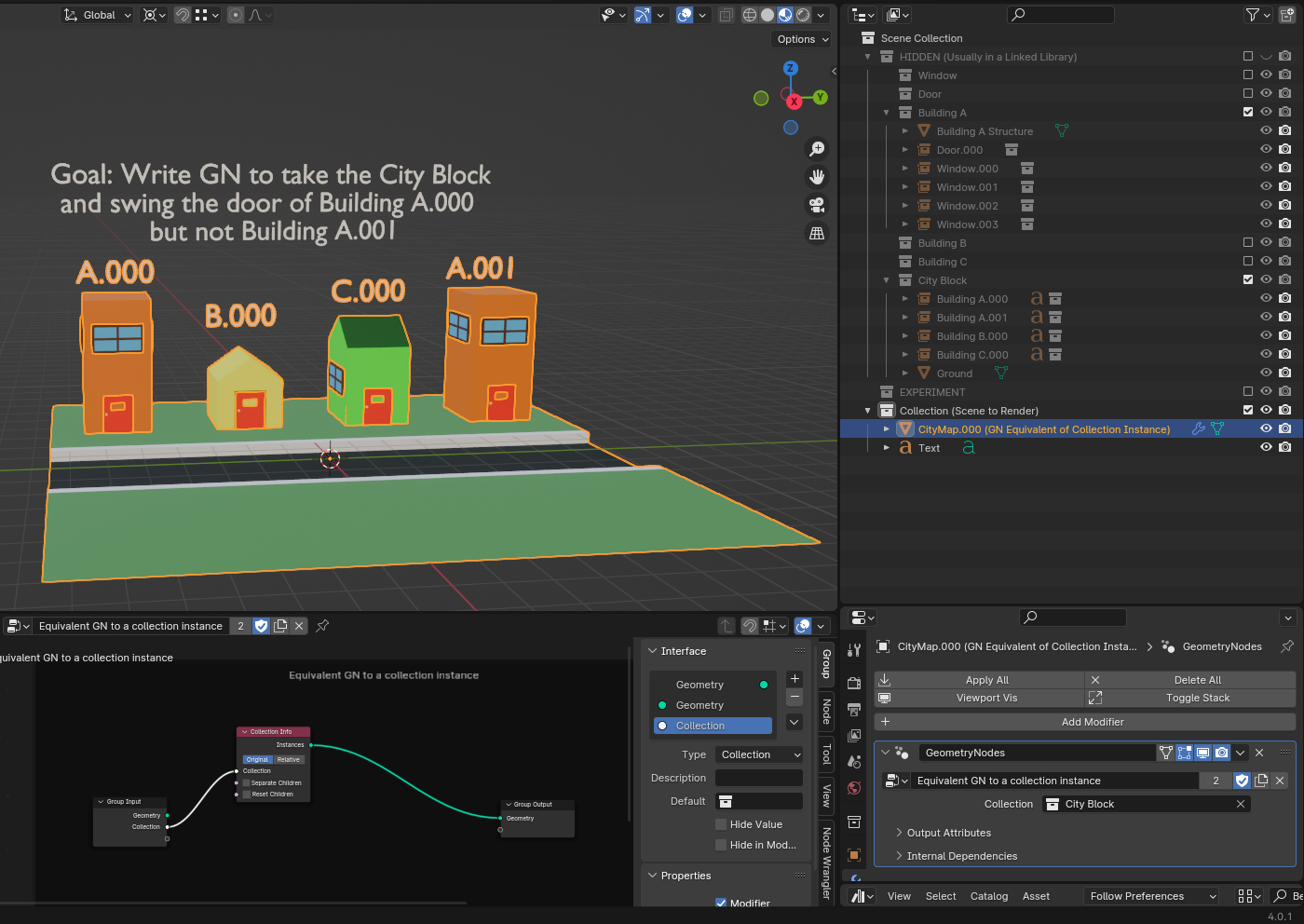
Towards the "Everything Nodes" goal, this could be even better than overhauling the library override system, because you can potentially do things with those individual instances (using further GN) you could never do with the library override system, even if its current limitations are fixed.
Such an improvement could also be useful for GN more generally, since when you're dealing with complex scenes, instances become critical for high performance. Just as important as vertices, edges, and faces.
PS1. AFAICT currently the CollectionInfo node has very limited support for identifying instances, but only as an integer index, and only on the top level. (For Case 1, you can pick one of the top-level instances, though I'm not sure if you can pick everything but that. Maybe with attributes? But for Cases 2, 3 which has nesting, doesn't help at all.)
PS2. You can't use rigging for the above case, because e.g. a practical city block model could have thousands of doors and windows, or other parts of a building someone might want to alter. Expecting the modeler to rig every single one of those isn't practical. But letting the model user identify an instance by hierarchy e.g. "City Block.000/Building A.000/Door" and modify that is.
Possible Issue: Currently GN only allows nesting to 8 levels. If you design your models using a hierarchy (a good modelling practice), that limit would be very rapidly exceeded. Converting instances to real as the Blender manual suggests isn't practical if you have a big model, which is the situation when instancing really delivers performance improvements.
2 Comments
A more specific idea: Modify the CollectionInfo node so it has:
Behavior:
Mod would be: As CollectionInfo code processes the instances, it checks against the Split path, and if it finds an instance in the Split path, it recurses and generates the instances within. When it hits the bottom of the Split path, it sends the terminating instance to the "Split Instance" output. Everything else goes to the "Instances" output as it does at the moment.
Still exploring alternatives and understanding the source so only an idea at this stage but seems the CollectionInfo implementation might be compatible with this, and it would probably be generally useful to users of GN (as collection filtering), as well as supporting the above use case.
Asked for ideas on Reddit about this:
For the Mesh+GeometryNodes, create the GN by bringing in other parts (as ObjectInfo or CollectionInfo nodes) to make it from parts (building frame, doors, windows), then using input attributes to modify those parts as desired (e.g. swing the door, open windows). Then set up sensible attribute defaults.
Then, later, if you want to modify the Mesh+GeometryNodes for a scene, you can modify the top-level GN to pass the attributes from the topmost modifier to those nested parts (so on into the nesting).
Not ideal because this still requires much extra work, but it gets around the current limitations of library overrides.