
View/Render Layer Selection for Scene strips
Summary
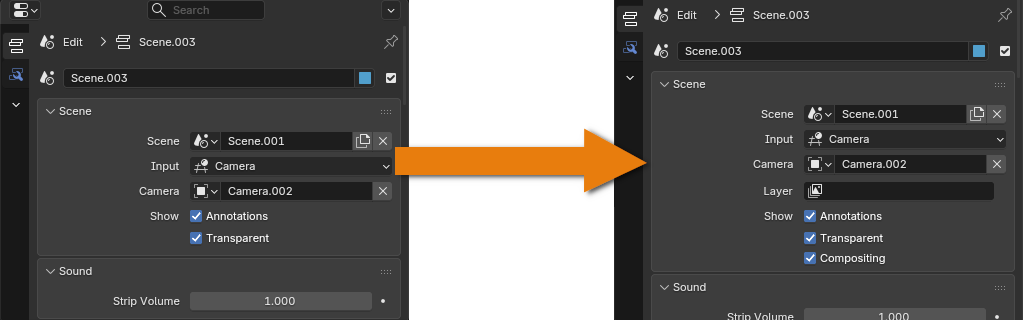
Add an option to choose a specific Layer for Scene strip to be rendered in VSE, much like the current option to select a specific Camera. If compositor is active, this layer can be used in the preview instead of default one. If compositor is not active, only the selected layer should be rendered, instead of rendering all of them and using only the default one.
Review
Currently to effectively work with multiple layers for a Scene we have to rely on in-scene Compositor. There is an option to animate render status of individual layers to increase performance, when specific layer becomes redundant.
But currently we do not have a convenient method to control render layers of a Scene on VSE level, which would be far more efficient for activation and disposal temporary layers, such as on screen text or other overlays. As for now we have to rely on different scenes or workarounds with using different offset Cameras.
More other there is ongoing issue that ignores render status animation for Layers within referenced Scene in VSE .
0 Comments