
Snap toggle in graph editor
When animating, one can quickly go from one keyframe to the next using the arrow keys - however "hand travelling" kinda breaks the flow. Often, when navigating a rather long shot in the graph editor, one will want to snap to a specific keyframe, and scrubbing from the timeline does not provide the visual context that some animators find useful for navigating the shot.
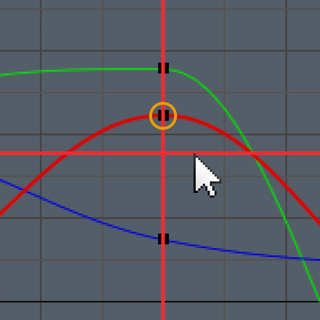
I suggest adding snapping capabilities to the 2D cursor inside the graph editor. It would work just like in the node editor : hold ctrl to snap to the nearest keyframe or keyframe value, or click the header toggle. Optionally, it could have toggles for "snap to frame" and "snap to value" so that the cursor would only snap vertically, or horizontally - then again, just as it works within the node editor.
Here is a mockup : youtu.be/AbXEOVP3z5I
I've only shown "snap to frame" in this video, but you get the idea.
Hadrien
4 Comments
also would be nice that the horizontal line would snap to the one keyframe or an average of all the selected ones.
@Luciano Muñoz: Are you thinking of the snapping behaviour in the 3DView : if snapping is on before one launches a transform session, pressing a over snappable elements (say vertices) will register them and average the snap position between them.
That sounds a bit complicated for my initial idea though, which was just supposed to help quickly navigate, not set the cursor value super precisely - we'd probably need buttons for that ?
YES!, also snapping to markers would be great!
@Luciano Muñoz: Good idea !