
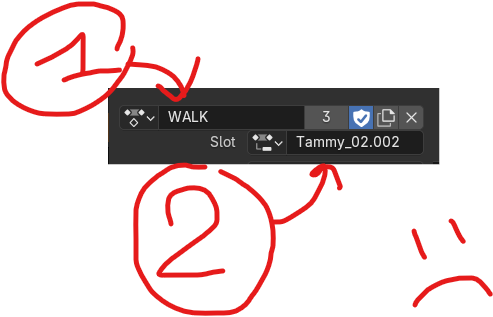
Auto assign sub-action, so it's again 1 click to assign an action, not two like with the new system.
Before 4.4 we could just slot in an action, super fast , only two clicks.
Now wehn we do that, nothing happens, because we also then need to assign the sub action, which is confusing and long and way less efficient than before. BUT it could just be that the first sub action is automatically assigned, thus avoiding to manually have to do a second action to assign actions.
Basically, just auto assign the first sub-action, it will be really waaaaayy better in the vast majority of cases, as 98% of the time we only ahve one sub actionin our actions, so currently the time it takes to assigna ctions is multiplied by two, for no reason, as sub-action would just be auto-assigned, mostly if there's ONLY one. ZERO reason to not assign it automatically.
3 Comments
Hi there, Blender developer here, and module owner of the Animation & Rigging module.
There's a reason Blender doesn't always assign this automatically, and I think it's a good one. Imagine you want to animate two objects with the same Action,
CubeandSuzanne:CubeandSuzannewhere they should be.Cube. This createsCubeActionwith a single slotCube.CubeActiontoSuzanne, with the intent of animating bothCubeandSuzannewith the same Action.Cubeslot toSuzanne, as that will overwrite any property ofSuzannewith the animated values for theCubeslot. In practice, it'll just snapSuzannetoCube, and if you undo, it will also undo the Action assignment. There would be no easy way to get around this.Blender will auto-assign based on the name. If you ensure the slots for a character are consistently named, Blender will just auto-assign them for you. When the slot names differ, Blender won't guess, and simply will avoid auto-assigning. We chose to design it so that it prioritizes the safety of your data over a small convenience.
Ah ok I see, thanks a lot.
It's just that in my case, 99.9% of time I don't use sub-actions, I retarget mocap so have rigify actions, that I append in another file to assign to various characters.
Before it would just apply the animation instantly, but now I need to do it in two steps, as by default nothing happens as the rigify object might not have the same name of the sub-action probably (it kinda should as taget and source rigify are basically the same), but the sub actions don't get applied along the action.
So in my case it's only practical in 0.1% of cases that sub-actions don't get force applied, the rest of the time it's twice as complex to apply actions compared to before the sub-action system.
When switching between Actions, Blender will remember the name of the last-assigned slot. If the next Action you assign has a slot with the same name, it'll just use that. It doesn't have to match the name of the object, just the last-used slot name.
You don't even have to bother manually creating a slot. When you start keying, Blender will create the Action (if none is assigned yet), and will create a new slot (if none is assigned yet). It will use the last-assigned slot name to create a new one. That way, switching between the newly-created Action and the previously-assigned Action will automatically pick the right slot.