
Search for Compare node with "Greater than"
Currently, the only way to "search" for the compare node is by typing "Compare" in the add menu.
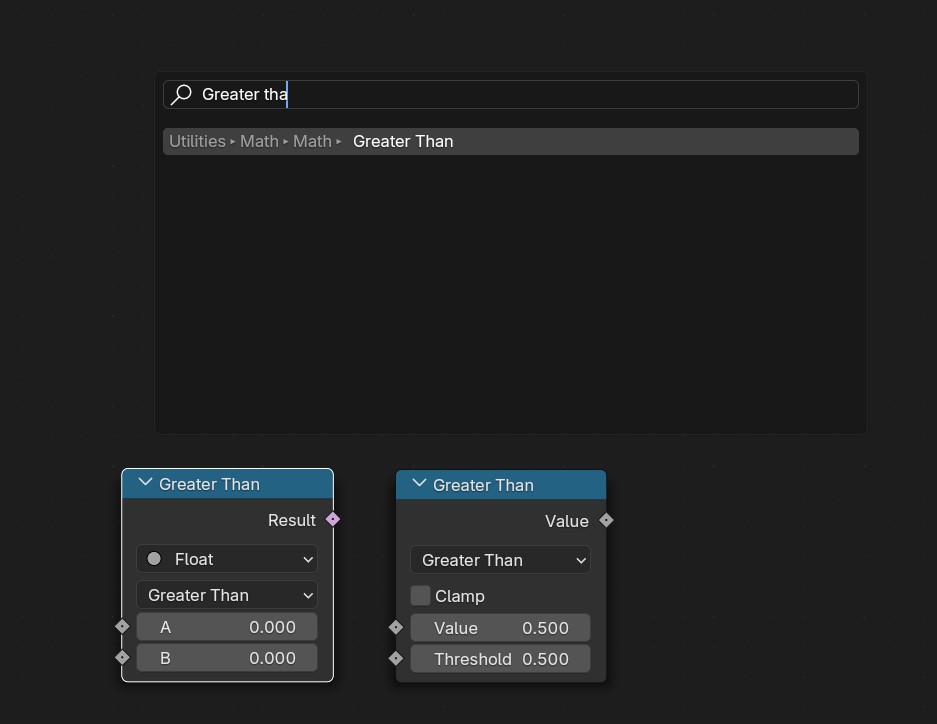
In comparison, with the math node, one does not need to type in "Math" to get the math node, typing the logic we are looking for suggests the math node with the logic already setup, see the exemple below with "Greater than".
Having another search suggestion with "Utilities - Math - Compare -> Greater Than" would allow us to quickly choose between Math and Compare node, depending on the output we want (respectively Float, or Boolean)
3 Comments
But there is no "compare" node, it's all one unique math node with different mathematical operations:
You are showing the Math node in "Compare" mode. But there is a Compare node (at least in 4.5), located in Utilities - Math. It outputs a boolean rather than a float. It's the one on the left in my screenshot, with the purple output, and the "Input Type" dropdown selection that allows you to choose between float, int, vector, string and color.
Indeed, my mistake.