
Rename non-active workspace tabs
Currently we can only rename the active workspace tab...
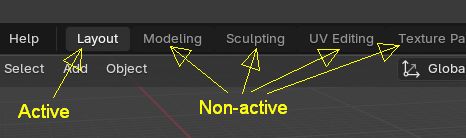 So in order to rename a workspaace tab you must first switch to it to make it active, and only then you can rename it by double clicking on it...
It would be handy if we could directly rename the non-active workspace tabs by just right click on them and choose "Rename" in the popup menu..
6 Comments
It's already possible. Simply double click to type a name, and keep double clicking other workspaces.
Demo: i.imgur.com/8Th0S50.mp4
Thanks for the tip... but that's a very strange way of doing it, imo. It only works if I first double click on the active workspace tab and then on the others. Having it on the right click menu would be far more intuitive, I think..
Then the title of the proposal should be changed to reflect the actual request, rename Workspaces from context menu. Because it is possible to rename without switching workspaces, just not in that way.
in 4.5 you don't have to switch to a workspace to double-click and rename it. But it does switch the workspace too.
That's the point, it switches.. if it was on the right click menu it would work as expected and the discoverability would be great...
How often do You rename it, so extra click is issue?