
Compute Device Zone (CPU / GPU) (GN)
Overview
This proposal introduces a new "Compute Zone" feature for Blender's node editor, designed to give users explicit control over the hardware execution target (CPU or GPU) for node computation. Inspired by the existing Repeat Zone, the Compute Zone allows users to encapsulate a set of nodes that will execute exclusively on a selected processor type.
Core Idea
The Compute Zone acts as a container for a sequence of nodes.
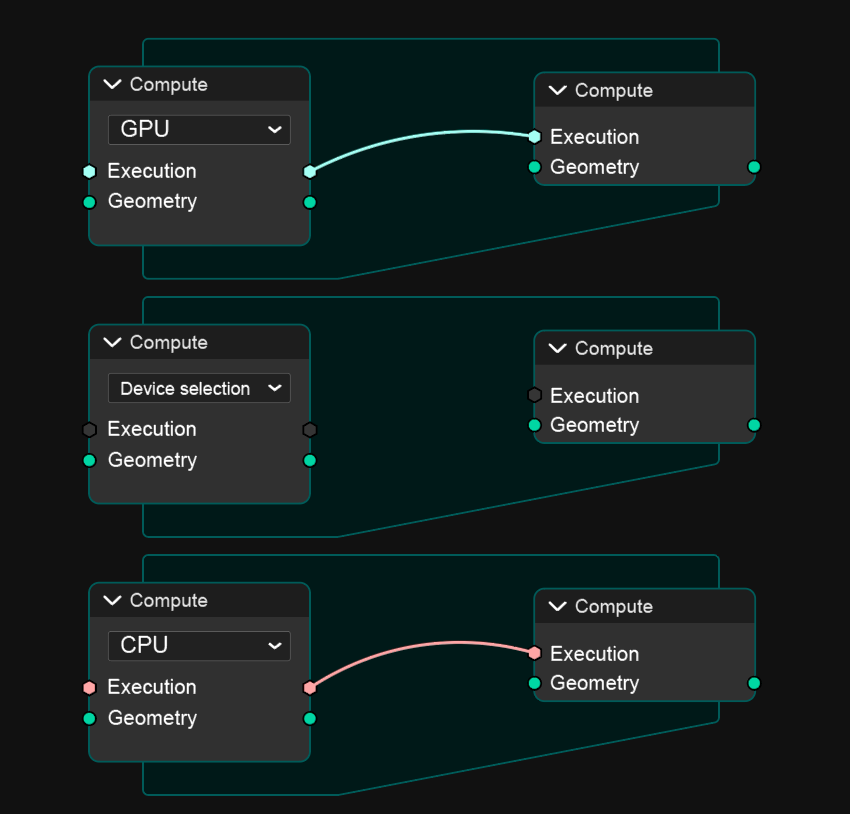
Instead of relying solely on Blender’s automatic device selection, users can manually define the execution target (CPU, GPU, or Auto) via the zone’s input socket.
Each Compute Zone has:
-
A device selector input (Enum:
CPU,GPU) -
Standard input/output sockets for data flow (
Execution,Geometry, etc.) - An internal execution context that routes all contained node computations to the specified device.
Example Use Case
A user working with complex geometry or volumetric nodes might:
- Create a Compute Zone to isolate a heavy geometry computation.
- Set the Compute Zone input to GPU to accelerate this part of the node tree.
- Later, create another Compute Zone with CPU selected for tasks better suited for single-threaded operations (e.g. procedural data generation)
This modular control enables hybrid execution strategies within the same node tree optimizing performance by leveraging both CPU and GPU in parallel workflows.
Technical Concept
Node Type:
ComputeZoneNode
Inputs:
-
Device Selection(Enum Socket: GPU / CPU) -
Execution(Trigger Socket) -
Geometry(Data Socket)
Outputs:
-
Execution -
Geometry
Behavior:
- On zone entry: Blender determines the device context based on the input.
- All internal nodes are executed on the chosen device.
- On exit: Results are passed back to the global execution context.
If different Compute Zones are chained together (e.g. one GPU zone followed by one CPU zone), the system will handle synchronization and data transfer between devices automatically, with color-coded execution links (ex. blue for GPU, pink for CPU).
Benefits
- Explicit control over hardware resource allocation.
- Optimized performance for mixed workloads.
- Simplified workflow for advanced users managing compute-heavy scenes.
- Visual clarity through color-coded links and device icons.
Visual Representation (Concept)
| Device | Link Color | Description |
|---|---|---|
| GPU | Cyan | Parallel computation on GPU cores |
| CPU | Pink | Sequential computation on CPU threads |
Implementation Suggestion
Right-Click on a Node → "Assign to Compute Zone" → "Create New" / "Add to Existing"
Once inside a Compute Zone, the node inherits the execution device context of that zone.
Summary
The Compute Zone concept enhances Blender’s node system with flexible, hardware-aware execution management.
By allowing users to partition and assign computation zones to specific devices, it bridges the gap between artist-friendly workflows and performance-driven computation design.
Btw with this feature is come possible to simulate in Realtime complex simulation by using the geometry nodes with CUDA (Nvidia) or OpenCL (AMD) core !
3 Comments
Isn't this is the kind of thing that blender already does automatically on a node by node basis? If not then the focus should be on doing this automatically because users shouldn't have to figure this out themselves.
This would be really tough for anyone using it because they would have to figure out which computation device is better for a specific system; some operations just aren't made for one of them and would decrease performance instead. This would also multiply the load on developers because they would probably have to code every new node once on GPU (or more times if it's going to be vendor specific as you suggest), and once on CPU, but before that they would have to update every node that only runs on only one type of device currently.
That’s a fair concern, but the proposal doesn’t aim to replace Blender’s automatic device management it’s meant to extend user control for advanced workflows where automatic selection isn’t optimal. Blender’s current per-node decision system is indeed efficient for general users, but it lacks the contextual grouping and forced execution control needed in specialized production pipelines. The Compute Zone concept would let artists deliberately isolate complex tasks that are known to perform better on a specific processor for instance, procedural mesh generation on CPU (due to single-thread precision and memory handling) while keeping heavy geometry evaluation or field operations on GPU It’s not about micromanaging every node, but defining performance boundaries. As for the implementation cost, it wouldn’t require rewriting all nodes only adapting the existing compute backends to respect the zone context, something already partially implemented in Cycles and Eevee. In short, this feature wouldn’t burden beginners but would empower power users who understand their system’s strengths. The goal isn’t redundancy it’s precision and control where automation currently falls short
Node artists should not have to have a computer science background to make a well performing node tree; that is what developers are there for. If a specific task is known to users to perform better on one device or the other, then there is every chance that developers will know as well and implement it.
Your idea also would create a massive problem for new users who think that GPU is always faster than CPU, so they would potentially ruin the performance of their nodes by always surrounding calculations in a GPU zone.
I'm not quite sure I understand your point about it being partially implemented in Cycles and EEVEE; they are completely separate from Geometry Nodes and use different processing to function.