
View addon name in the keymap
One of the issues that I encountered recently is going through the keymap and trying to figure out which key belonged to which addon.
If you have a bunch of addons, this almost becomes impossible as they are fused with other normal shortcuts. Many times having the same name.
Having a separate category for addons would allow users to monitor shortcut changes and conflicts more easily.
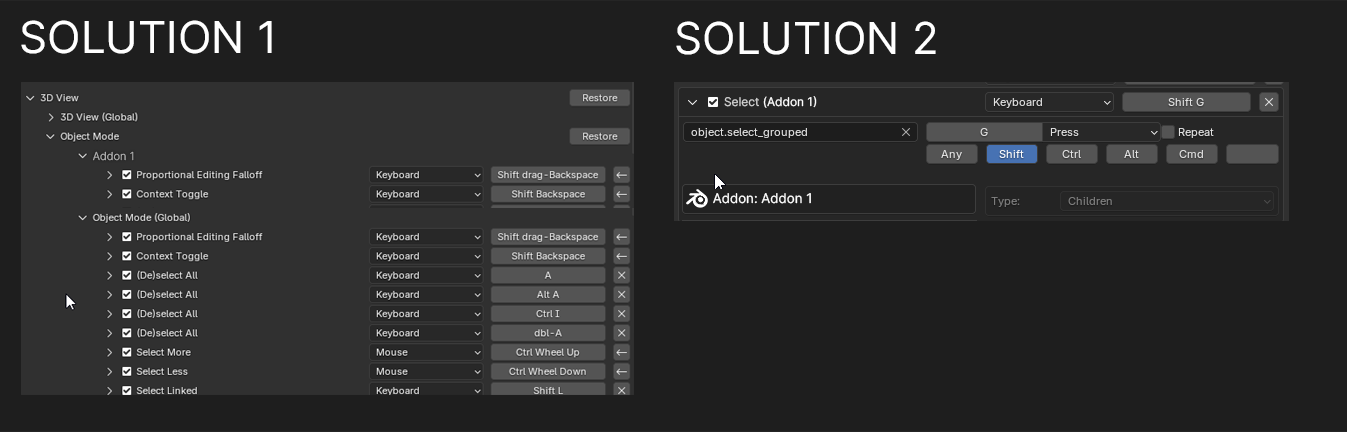
Possible solutions:
-
- have subcategories for each addon shortcuts.
-
- or have the name of the addon in the expanded shortcut window.
2 Comments
It's probably part of why some addons make their keymaps visible in their addon preferences in the first place:
That is true, but the thing is addons are prone to mistakes. 3D Viewport Pie Menu, for example, failed when I was transitioning to a different version; it duplicated the pie menu shortcuts and gave errors on the old ones. Also made it so I could not interact with the old ones in the addon view, so I had to search for them in the keymap, but because of the error, It didn't give me the name of the shortcut or the details in the addon menu, so it was a whole thing and I ended up reinstalling because it was easier then searching through every keymap category. This issue would have been solved if the keymap had an addon section.